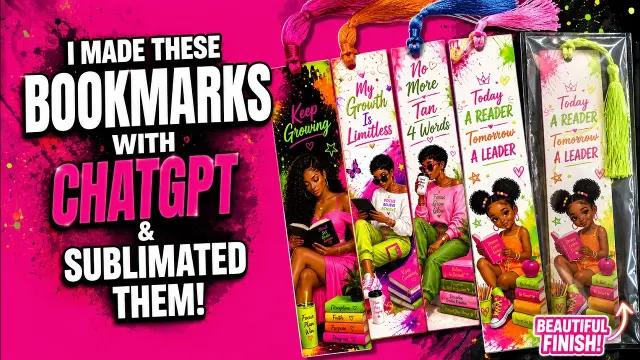
Sublimation Bookmarks Made With AI Art and Blank MDF
Tutorial on creating bookmark designs, then sublimating them onto blank MDF bookmarks finished with tassels.
YouTube · A Journey with Amarie · 8 June 2026 Watch on YouTube
Tried this idea? Show how yours turned out.
I made this#ChatGPT #Sublimation #Bookmarks #AICrafts #DIYBookmarks #EtsySeller #DigitalProducts #CraftBusiness #SublimationTutorial #SmallBusiness #AIDesign #BookmarkMaking #CreativeBusiness #CraftingWithAI #PrintOnDemand
How to do it
What you need
- Blank MDF bookmarks with holes and tassels
- Sublimation paper
- Sublimation printer with AI art designs
- ChatGPT (to generate bookmark designs)
- Heat press
- Tassels
Step by step
- Use ChatGPT to generate the bookmark designs and text.
- Print the designs onto sublimation paper with a sublimation printer.
- Place each printed design against a blank MDF bookmark, design side facing the blank.
- Secure the paper to the bookmark so it cannot shift.
- Heat press the bookmark to transfer the design.
- Peel the sublimation paper away from the finished bookmark.
- Thread a tassel through the hole at the top of each bookmark.
Tips
- Use blank MDF bookmarks made for sublimation, sold with holes and tassels included, so the finish comes out clean.
- Sublimation blanks are double-sided, so print a design for each face if you want pattern on both sides.
- Keep the finished bookmarks clean and dry until they are packaged for sale.
Written by Tagrazzi from the original's description and photo.
The title and summary are written by Tagrazzi; the video belongs to its creator and plays from YouTube.
Comments (0)
No comments yet. Be the first to comment.
Sign in to write a comment.