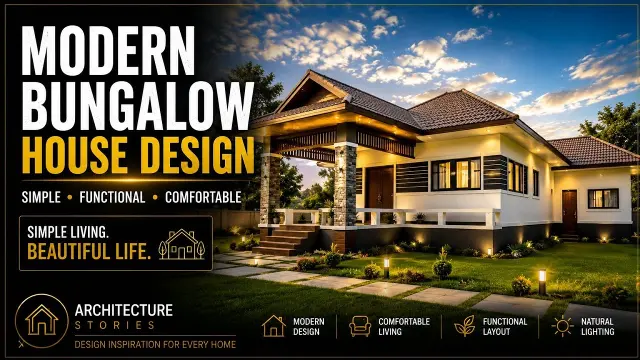
 Simple Modern Bungalow Exterior Concept for Small and Medium Lots
#3D Rendering
2 ideas
Simple Modern Bungalow Exterior Concept for Small and Medium Lots
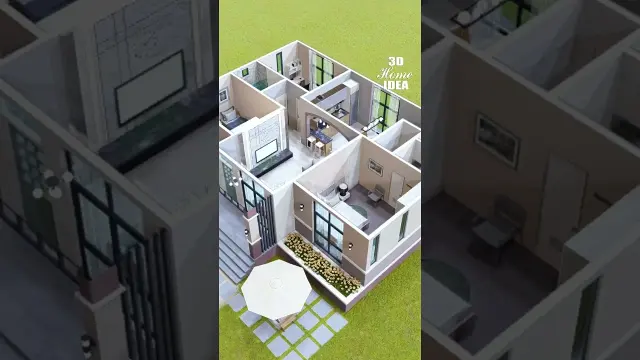 Three-Bedroom Contemporary Bungalow With Hip Roof and Covered Porch
Get new #3D Rendering ideas by email
Every Thursday: the week's best ideas, with the newest from #3D Rendering.
Related tags
3D Rendering Guide
What 3D rendering is
3D rendering is the process of turning a digital three-dimensional model into a finished image or animation. It is used to show how an object, room, building, product, or scene might look before it exists in real life. The model gives the shape and structure, while the rendering adds light, color, materials, shadows, and atmosphere.
You will find 3D rendering in architecture, interior design, product visualization, film, games, and advertising. It helps people understand form, scale, and style more clearly than a flat drawing can. A rendering can be realistic, stylized, minimal, or highly artistic, depending on the goal.
Where it comes from
Read more
3D rendering developed from computer graphics and digital modeling. As software and hardware improved, it became possible to create more detailed and believable images from virtual scenes. Today, it is a standard part of many creative and technical workflows, especially when a project needs to be explained before it is built or produced.
Main kinds of 3D rendering
There are several common approaches, and each one serves a different purpose:
- Realistic rendering aims to imitate real-world materials, lighting, and textures as closely as possible.
- Conceptual rendering is simpler and is often used to communicate an idea quickly.
- Architectural rendering shows homes, buildings, interiors, and landscapes before construction.
- Product rendering presents an object clearly, often for design review or marketing.
- Animation rendering creates a sequence of images that move over time.
Some renderings look polished and photographic, while others are deliberately clean and diagram-like.
What beginners should know
If you are new to 3D rendering, start with the basics: modeling, materials, lighting, camera angle, and composition. A good model is important, but even a simple scene can look strong with thoughtful lighting and a clear viewpoint.
It helps to think like a photographer. Consider where the light comes from, what the main subject is, and what you want the viewer to notice first. A cluttered scene can distract from the design, while a well-framed image feels calm and readable.
Do not worry about perfect realism at first. Many good renderings begin with simple shapes and limited materials. As you gain confidence, you can refine reflections, shadows, surface texture, and background details.
Practical tips
- Use clean geometry and keep your model organized.
- Choose materials that match the real-world behavior of the object.
- Pay attention to scale, since proportions strongly affect realism.
- Light the scene carefully; lighting often matters more than extra detail.
- Keep the composition simple if you want the subject to stand out.
- Check your rendering from different angles before finishing.
3D rendering is both technical and creative. It rewards patience, observation, and a good eye for balance. Whether you want to present a house, a product, or an imaginary scene, the goal is the same: to make an idea feel clear, believable, and complete.
#3D Rendering: frequently asked questions
How do I get started with 3D rendering if I have never tried it?
Begin with the fundamentals rather than chasing photorealism: build simple shapes, assign a few basic materials, and experiment with where the light comes from. Think like a photographer when you place the camera, deciding what the viewer should notice first. Small, uncluttered scenes are the fastest way to learn how modeling, lighting, and composition work together.
What do I actually need before I can produce a rendering?
You need a three-dimensional model of your subject, a rendering tool that can light and shade it, and a clear idea of the viewpoint you want to show. Beyond that, the essentials are an understanding of scale, materials, and lighting rather than expensive equipment. Many beginners get good results from modest setups simply by keeping the scene clean and well framed.
Which type of rendering should I choose for my project?
It depends on what the image has to do: a quick conceptual view communicates an early idea, while a realistic render is better for showing finished materials and atmosphere. Architectural and product work each have their own priorities, such as accurate proportions or a clear read of the object's form. Animation is worth the extra effort when movement or a walk-through helps explain the design.
What mistakes do beginners make most often?
The usual ones are crowding the frame with unnecessary objects, ignoring true-to-life scale, and adding more detail when the lighting really needs attention. Another common trap is pushing for perfect realism too early, which makes the process frustrating instead of instructive. Checking the scene from several angles before you finish catches most of these problems.
Can a rendering help me present a home design before it is built?
Yes, and this is where rendering is most useful: an exterior view lets someone see the roof shape, the porch, the massing, and how the house sits on its lot long before anything is constructed. It makes discussion about style and proportion far easier than a flat plan or a list of specifications. Interior views work the same way for room layout, finishes, and daylight.
Does a rendering have to look completely photorealistic to be good?
Not at all. A clean, stylized, or diagram-like image often explains a design more clearly than a heavily textured one, especially in the early stages of a project. What matters is that the proportions read correctly, the lighting supports the subject, and the idea feels believable and complete.
Videos come from YouTube and posts from Instagram; titles and summaries are our own. All rights belong to their creators.