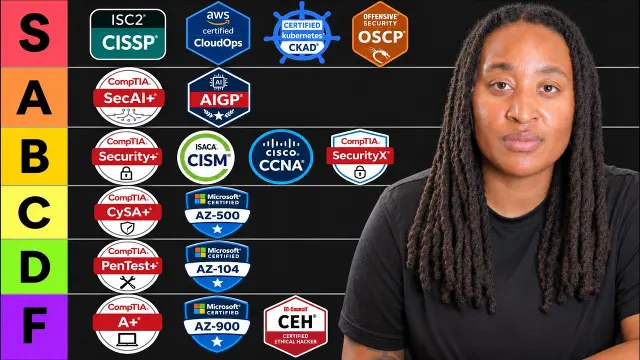
 Which Tech Certifications Are Actually Worth the Time and Money
#IT Career
1 ideas
Which Tech Certifications Are Actually Worth the Time and Money
Get new #IT Career ideas by email
Every Thursday: the week's best ideas, with the newest from #IT Career.
Related tags
Building a Career in IT: A Practical Starting Guide
Information technology is the work of building, running and protecting the systems an organisation depends on. It is a wide field rather than a single job: the person answering a support request, the engineer designing a network, the analyst pulling a report from a database and the specialist watching for intrusions all work in IT, and their days look almost nothing alike. That breadth is the field's main attraction and its main source of confusion for newcomers, who often picture one narrow role and are surprised by how many directions the work can take.
How the work is usually divided
Most IT roles sit in a few overlapping areas. Support and operations keep existing systems usable — troubleshooting, accounts, devices, backups. Infrastructure covers networks, servers and the platforms that host services, whether in a company's own building or with a cloud provider. Development builds software, from small internal tools to large applications. Data work covers databases, reporting and the pipelines that move information between systems. Security runs across all of them: access control, monitoring, incident response and the policies underneath.
The routes people take
Read more
There is no single entrance. Some people study computing formally, through a degree or a vocational course; many others arrive sideways, from another industry, by teaching themselves or by starting in a support role and growing from there. Career changers are common, and their previous experience — dealing with customers, organising work, explaining things clearly — is often more valuable than they expect.
Certifications can help, especially early on, because a structured syllabus gives you something to aim at. Their weight varies by employer and by role, so treat them as one signal among several rather than a guarantee. A small portfolio of things you have actually built, or a home lab where you can break and fix your own setup, usually teaches more than a badge on its own.
What beginners should know
Aim for breadth first, then depth. Understand roughly how networks move data, get comfortable with one operating system, learn a little scripting, and practise reading an error message before searching for it. Fluency with the command line pays off repeatedly. So does documentation: writing down what you changed and why is a professional habit, not paperwork.
The skill people underestimate is explanation. Being able to describe a technical problem to someone who does not share your vocabulary is often what separates a useful colleague from a brilliant one.
Habits worth building early
- Keep a learning log of problems solved, so you can see progress.
- Build small things end to end rather than studying endlessly.
- Ask questions before you guess, especially on systems others rely on.
- Treat other people's data as if it were your own.
- Protect your own accounts and devices as carefully as your employer's.
Looking after yourself
The work involves long stretches at a screen and, in some roles, out-of-hours cover. Take breaks, keep a boundary between work and rest, and raise workload concerns with your manager early rather than absorbing them silently. A sustainable pace will take you further than a short burst of intensity.
Start with one area that interests you, get genuinely good at the basics, and let the rest follow.
#IT Career: frequently asked questions
How do I get into IT when I have no experience at all?
Most people start where the barrier is lowest: a support or service-desk position, where you handle real tickets and learn how systems actually fail. Alongside applying, set up a small lab of your own so you can install something, break it, and fix it without anyone depending on you. That combination of a real job and self-directed practice is what most entry routes look like in practice.
Do I need a degree to work in IT?
There is no single entrance, and plenty of people arrive through a vocational course, self-teaching, or a sideways move from an unrelated industry. What employers tend to look for is evidence you can do the work, which a small portfolio of finished projects demonstrates better than a certificate alone. Experience dealing with customers, organising messy work, or explaining things clearly often transfers more than career changers expect.
How do I decide which part of IT to specialise in?
Sample the field before committing: support, networks and servers, software, data, and security all feel completely different day to day, and you cannot judge them from a job title. Spend a few weeks on each of two or three areas and notice which problems you keep returning to voluntarily. Breadth first, then depth, is the order that usually works.
Are certifications worth the time when you are starting out?
They help most early on because a structured syllabus gives you a target and forces you to cover ground you might skip on your own. Their weight varies a lot between employers and roles, so treat one as a signal rather than a promise of a job. Pair it with something you built yourself, since a working project teaches more than a badge does.
What do beginners in IT most often get wrong?
The common ones are going deep on a single tool before understanding the basics around it, and guessing at a fix instead of asking or reading the error message first. Another is skipping documentation, so nobody — including you a month later — knows what was changed and why. Treating other people's data and your own accounts with the same care is a habit worth forming from day one.
Which skill is most underrated in an IT career?
Being able to explain a technical problem to someone who does not share your vocabulary, in plain words and without condescension. It shapes how quickly issues get resolved, how much people trust you, and how far you move once the technical basics are solid. Fluency at the command line and clear writing both serve the same end: making complicated things legible to other people.
Videos come from YouTube and posts from Instagram; titles and summaries are our own. All rights belong to their creators.