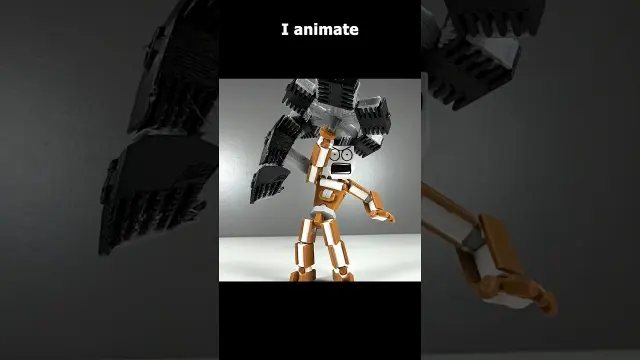
 How to Animate Smear Frames in Stop-Motion Animation
#Smear Frames
1 ideas
How to Animate Smear Frames in Stop-Motion Animation
Get new #Smear Frames ideas by email
Every Thursday: the week's best ideas, with the newest from #Smear Frames.
Related tags
Smear Frames: Faking Speed in Stop-Motion Animation
A smear frame is a single image that stands in for movement too fast for the frame rate to show cleanly. Instead of drawing or posing every step of a quick action, the animator inserts one distorted, stretched or repeated image, and the viewer's eye fills in the rest. The result reads as a blur — the same way a waving hand looks like a streak rather than a series of positions.
The idea comes from hand-drawn animation. When a character swings an arm or turns a head in only a few frames, drawing each position honestly can look stiff or flickery. Animators learned to draw an exaggerated in-between: an arm stretched into an arc, several copies of a hand fanned out, a head stretched into a wedge. Seen for a fraction of a second, the eye merges these into speed. The technique crossed over into stop-motion, where it solves a particular problem: a puppet cannot blur.
Why stop-motion needs them
Stop-motion is shot frame by frame, so every image is sharp. Fast movement then looks like a series of crisp jumps — sometimes charming, sometimes jarring. A smear frame softens that jump by giving the eye something continuous to follow. It also disguises the places where a rig, wire or support had to be hidden, because the frame is meant to be unreadable anyway.
Read more
The main approaches
- Motion blur in camera. The puppet is moved while the shutter is open, either by hand or with a motorised rig, so it records as a streak. This needs a dark set and a long exposure, and the amount of blur is decided by how fast and how far you move.
- Substitution smears. The blurred position is sculpted or printed as a separate object, then swapped in for one or two frames. The replacement can be squashed, stretched, or duplicated several times along the path of the action.
- Multi-limb frames. Extra arms, legs or copies of a prop are placed in the same shot so that one frame contains the whole arc of the movement.
- Digital smears. Frames are stretched or blurred afterwards in editing software, which is easier to control but can look smoother than the surrounding animation.
What beginners should know
Start by studying the timing. A smear is only convincing if it arrives where the motion is fastest and leaves before the eye can study it. One or two frames is usually enough; three starts to look like a mistake. Match the smear's direction to the action, and stretch along that line rather than in every direction at once.
Keep the puppet's silhouette readable. A smear that erases the character entirely reads as a glitch, while one that keeps a hint of shape reads as speed. Practise with small actions first — a hand snatching an object, a head snapping round — before attempting full-body moves.
Finally, remember that smears are a tool, not a rule. Animation that never blurs can feel deliberate and crisp; a few well-placed smears give it punch. Test each one in motion rather than judging it as a still image, and use them where the story needs energy.
#Smear Frames: frequently asked questions
What exactly is a smear frame, and why do animators use one?
It is a single drawn or shot image that replaces the many positions of a very fast action with one stretched, blurred or repeated shape. Because the eye blends it with the frames around it, the audience perceives speed instead of a stiff jump. Animators reach for it whenever an honest frame-by-frame rendering of a quick movement would look flickery or mechanical.
How do I begin experimenting with smear frames if I've never made one?
Pick a small, fast gesture — a hand grabbing something, a head turning sharply — and study where in the action the motion peaks. Place your smear there and remove it again almost immediately, so the eye never has time to examine it as a still. Working with a simple action keeps the shape manageable while you learn the timing.
Which method should I choose: in-camera blur, a substituted object, or a digital smear?
Choose based on what your set and rig can actually do. Moving the puppet under an open shutter gives an organic streak but demands a dark set and a long exposure, while a sculpted or printed replacement is easier to repeat and can be squashed or duplicated along the arc. Digital smears are the easiest to control, though they can end up looking smoother than the frames surrounding them.
How do I keep a smear frame from looking like a mistake?
Preserve a trace of the character's silhouette — a smear that wipes the figure out entirely reads as a glitch rather than as speed. Stretch the shape along the direction of travel instead of fanning it out in all directions at once. Then judge the result played back in motion, not as a single still, since the effect only exists in sequence.
What kinds of scenes or occasions benefit most from a smear?
Anything with a snap, a swing or a sudden impact: a character whipping around, a prop thrown across the set, a limb lashing out. Smears also help when a rig, wire or support has to disappear for a moment, because the frame is meant to be unreadable anyway. Quieter, more deliberate animation usually looks better left crisp.
What is the most common beginner error with smear frames?
Overusing them. Holding a smear too long turns it into a visible distortion, and spreading them through every movement drains the punch that makes a well-placed one work. Treat them as an accent rather than a rule, and remember that animation with no blur at all can feel perfectly intentional.
Videos come from YouTube and posts from Instagram; titles and summaries are our own. All rights belong to their creators.