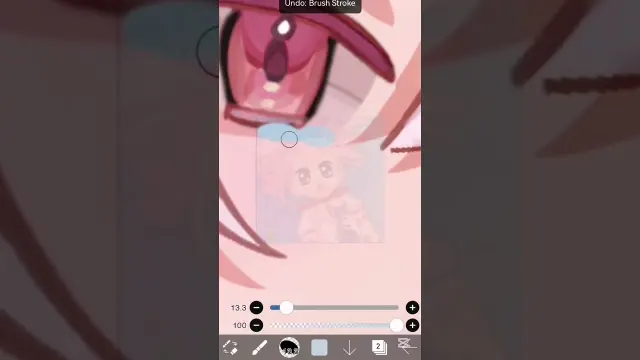
How to draw tears running down a face in digital art
A digital painting tutorial showing how to draw tears falling down a character's face using the app Ibis Paint X.
YouTube · pink pawz ୨ৎ · 26 October 2026 Watch on YouTube
Tried this idea? Show how yours turned out.
I made thisHow to do it
What you need
- Ibis Paint X app
- stylus or finger
- brush tool
- light blue color
- reference image layer
- eraser
- layer opacity control
Step by step
- Place the face artwork on one layer and add a new layer above it for the tears.
- Open a reference image in a floating, semi-transparent window over the canvas so you can compare shapes.
- Choose a small brush size, around 13, and lower the opacity slider so the stroke stays soft.
- Pick a light blue shade and draw the tear as a rounded drop following the line of the lower eyelid.
- Build the drop up in thin strokes rather than one heavy stroke, so it reads as translucent.
- Use the eraser to tidy the edges and clear the undo toast with the undo button if a stroke goes wrong.
Tips
- Keep the brush opacity low and layer several light strokes instead of one opaque one for a wet, see-through look.
- Match the tear's blue to the tones already in the skin and eye so it doesn't look pasted on.
- Float your reference over the canvas while drawing so you can check the drop shape against the original.
Written by Tagrazzi from the original's description and photo.
The title and summary are written by Tagrazzi; the video belongs to its creator and plays from YouTube.






Comments (0)
No comments yet. Be the first to comment.
Sign in to write a comment.