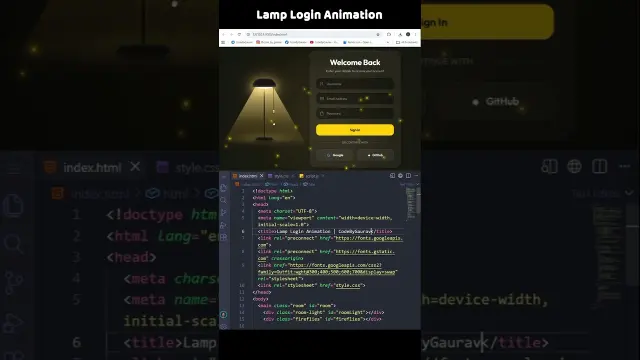
Animated Login Form UI Design Using HTML and CSS
A tutorial on creating a modern login form UI with smooth transitions, interactive effects, and clean input fields.
YouTube · CodeByGaurav · 22 September 2026 Watch on YouTube
Tried this idea? Show how yours turned out.
I made this#html #css #webdevelopment #webdesign #frontend #coding #loginform #loginui #loginanimation #cssanimation #uidesign #frontendproject #htmlcss #webdeveloper
How to do it
What you need
- Text editor or code editor
- index.html file
- style.css file
- Web browser for preview
Step by step
- Create an HTML file with a <form> containing an email field, password field and a Sign In button.
- Link the stylesheet in the <head> so the CSS applies to the form.
- Style the form card with a dark background, rounded corners and centered layout.
- Style the input fields with clean borders, padding and placeholder text.
- Add CSS transitions and a hover effect so the fields respond when focused and the button highlights on hover.
- Add the animated lamp graphic above the form to give the page its signature animation.
- Open the HTML file in a browser and adjust the CSS until the transitions look smooth.
Tips
- Keep the HTML and CSS in separate files so the styling is easy to reuse in other projects.
- Use smooth transition timing on inputs and buttons rather than abrupt changes for the polished look shown.
- Test hover and focus states in the browser, since those effects are the main interactive part of this UI.
Written by Tagrazzi from the original's description and photo.
The title and summary are written by Tagrazzi; the video belongs to its creator and plays from YouTube.







Comments (0)
No comments yet. Be the first to comment.
Sign in to write a comment.