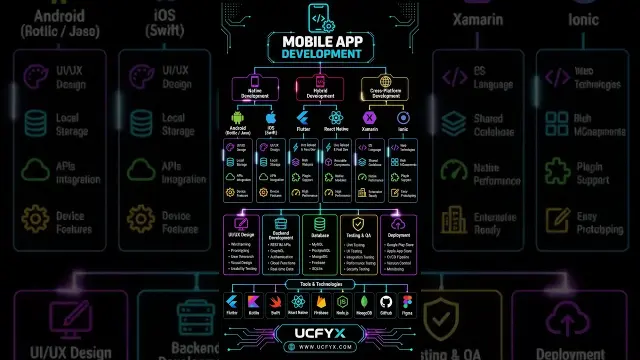
 Mobile App Development Learning Roadmap for 2026
#Mobile Development
3 ideas
Mobile App Development Learning Roadmap for 2026
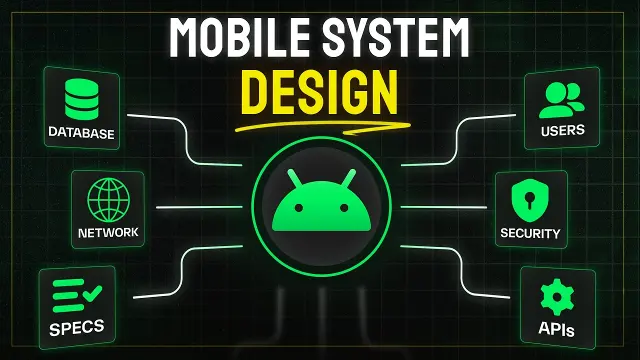 Beginner Guide to Mobile App System Architecture and Design Tips
 The Four Types of Offline Caches in Android Mobile Design
Get new #Mobile Development ideas by email
Every Thursday: the week's best ideas, with the newest from #Mobile Development.
Related tags
Mobile Development Guide for Beginners
What mobile development is
Mobile development is the process of designing and building software for phones and tablets. These apps can be small and simple, like a calculator or to-do list, or more complex, like a shop, a camera tool, or a social app. Because mobile devices are used in short sessions and on small screens, mobile development asks you to think carefully about clarity, speed, and ease of use.
Mobile apps usually run on the two main mobile operating systems. Each platform has its own design rules, programming tools, and ways of handling navigation, storage, notifications, and device features. Some apps are built separately for each platform, while others are made to work across more than one with a shared codebase.
Common approaches
Read more
There are several ways to build a mobile app:
- Native development: you build specifically for one platform, which can give strong performance and close access to device features.
- Cross-platform development: you write one codebase that can run on more than one platform, which can save time and keep the app more consistent.
- Web-based mobile apps: these run in a browser and can feel lighter to maintain, though they may have limits compared with fully native apps.
The right choice depends on your goals, your team, and the kind of experience you want to create.
What makes a good mobile app
A good mobile app is easy to understand, quick to respond, and pleasant to use with one hand. Small screens leave little room for clutter, so clear structure matters. Good mobile apps usually have:
- simple navigation
- readable text and touch-friendly controls
- fast loading and smooth transitions
- thoughtful use of device features such as camera, location, or notifications
- reliable behavior even when the connection is weak
Users often return to apps that feel predictable and reduce effort. That means the app should behave consistently, avoid unnecessary steps, and make it easy to recover from mistakes.
Skills and basics to learn
If you are starting out, focus on a few core areas first:
- one programming language and its mobile framework
- basic user interface design for small screens
- how data is stored and retrieved
- how app screens connect to each other
- how to test on different device sizes and operating system versions
It also helps to understand common patterns such as lists, forms, tabs, and detail screens. These appear in many apps, so learning them well gives you a strong foundation.
Practical tips for beginners
Start with a small project and finish it before moving on. A simple app teaches you more than a large unfinished one. Keep your first designs plain and clear, then improve them step by step.
Remember to test on real devices when you can, because apps can behave differently in practice than they do in an emulator. Pay attention to battery use, network handling, and what happens when the app is paused or interrupted.
Most importantly, build with the user’s context in mind. People use mobile apps while walking, waiting, or switching between tasks, so mobile development is as much about restraint and clarity as it is about features.
#Mobile Development: frequently asked questions
How do I start learning mobile development as a beginner?
Start with one programming language and the mobile framework that goes with it, then build a very small app first. Focus on simple screens, basic navigation, and how data is stored and shown before moving on to bigger features.
Should I build a native app or choose a cross-platform approach?
Native development is a good choice when you want the best performance and close access to device features. Cross-platform development is often better when you want to reuse one codebase and keep the app experience consistent across devices.
What do I need to understand before making a mobile app?
You should know the basics of user interface design for small screens, how screens connect, and how to save and retrieve data. It also helps to learn common app patterns like lists, forms, tabs, and detail pages.
What makes a mobile app feel well designed and easy to use?
A good mobile app is clear, quick, and easy to use with one hand. Simple navigation, readable text, touch-friendly controls, and smooth loading all help the app feel predictable and pleasant.
What are the most common mistakes new mobile developers make?
A common mistake is trying to build too much at once and ending up with an unfinished app. Other frequent problems are cluttered layouts, weak testing on real devices, and forgetting to handle weak connections or interruptions smoothly.
Videos come from YouTube and posts from Instagram; titles and summaries are our own. All rights belong to their creators.