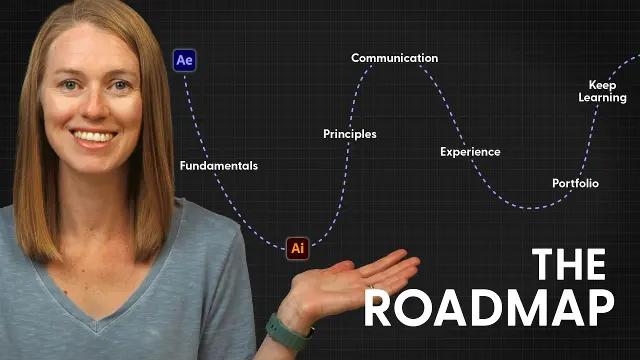
 Motion Design Roadmap and After Effects Guide
#Motion Design
2 ideas
Motion Design Roadmap and After Effects Guide
 Highest-Paying Design Careers and Roles
Get new #Motion Design ideas by email
Every Thursday: the week's best ideas, with the newest from #Motion Design.
Related tags
Motion Design Guide
Motion design is the art of giving movement to graphic elements such as text, shapes, illustrations, icons, and photographs. It sits between graphic design, animation, and filmmaking. You see it in title sequences, explainer videos, social media clips, app interfaces, presentations, and brand films. At its core, motion design uses timing, rhythm, and visual change to make information easier to understand and more engaging to watch.
What motion design is for
Motion design is often used to explain ideas, guide attention, and create mood. A small movement can show hierarchy, reveal a message step by step, or make a complex topic feel clearer. In branding, it helps a visual identity feel alive. In digital products, it can support navigation and feedback, such as a button response or a smooth transition between screens.
It is not limited to entertainment. Good motion design has a purpose: it helps the viewer follow what is happening without feeling overwhelmed.
Read more
Main forms and styles
There are many ways to approach motion design, and the style usually depends on the goal.
- Kinetic typography uses moving text to emphasize words, pace, or emotion.
- Explainer animation combines graphics and movement to teach or simplify a subject.
- Logo animation gives a brand mark a memorable entrance or exit.
- UI motion focuses on subtle transitions in websites and apps.
- Character and object animation brings illustrated figures or scenes to life.
- Abstract motion uses shapes, lines, light, and color for a more atmospheric look.
Some motion design feels clean and minimal, while other work is bold, playful, hand-drawn, or highly cinematic. The most effective style is usually the one that fits the message best.
Techniques that make motion work
Strong motion design depends on a few core principles. Timing controls how fast or slow something moves. Spacing affects whether motion feels smooth, sharp, or energetic. Easing makes movement feel more natural by avoiding stiff starts and stops. Contrast helps the viewer notice what matters most.
You can also use layering, masking, scaling, rotation, parallax, and transitions to create depth and interest. Sound can support motion, but the visuals should still make sense on their own.
What beginners should know
If you are starting out, begin with simple shapes and short scenes. Focus first on clear movement rather than complex effects. A small animation with good timing is usually stronger than a busy one that is hard to follow.
It also helps to think like a designer before thinking like an animator. Ask yourself what the motion should communicate, where the eye should go, and how long each moment should last. Storyboarding or sketching a sequence before animating can save time and keep the idea clear.
Practical tips
- Start with a single message or action.
- Keep transitions purposeful, not decorative.
- Use consistent motion language throughout a project.
- Leave enough pause for the viewer to absorb information.
- Check that the animation still works without sound.
- Simplify whenever movement begins to distract from the content.
Motion design is at its best when movement feels natural, useful, and expressive. When it is done well, it does not just decorate a design. It helps the viewer understand it.
#Motion Design: frequently asked questions
How do I start learning motion design as a complete beginner?
Begin with simple shapes and short scenes rather than long, complex projects, and concentrate on making the movement itself clear and readable. Sketch or storyboard the sequence before you animate so you know what the motion is meant to communicate. Once the basics feel natural, you can gradually add layers, transitions, and effects.
What skills or tools do I need to get into motion design?
You need a designer's eye more than advanced technical tricks: an understanding of composition, hierarchy, and pacing is what makes movement meaningful. On the practical side, you will work with animation software that lets you keyframe position, scale, opacity, and timing. Learning the core principles of timing, spacing, and easing matters far more than collecting many programs.
Which style of motion design should I choose for my project?
Pick the style that fits the message rather than the one that looks most impressive. Moving text suits emphasis and pacing, explainer graphics suit teaching a subject, and subtle interface motion suits guiding someone through a product. A clean minimal approach and a bold playful one can both work; the question is which one carries the idea most clearly.
How do I make animated movement look smooth and natural?
Focus on easing so nothing starts or stops abruptly, and adjust the spacing between keyframes to control whether motion feels calm or energetic. Consistent timing across elements keeps a piece feeling like one coherent language. Adding pauses gives the viewer room to absorb what just happened.
What are the most common mistakes beginners make in motion design?
The usual trap is adding movement for decoration rather than purpose, which leaves the viewer unsure where to look. Another is overloading a scene with effects so the original message gets buried. Simplify whenever the animation starts competing with the content, and check that it still reads without sound.
How is motion design used in branding and digital products?
In branding, animation gives a visual identity life, often through a memorable logo entrance or a consistent feel across brand films. In apps and websites, motion supports navigation and feedback, such as a button response or a smooth transition between screens. In both cases the movement should help the viewer follow what is happening rather than simply impress them.
Videos come from YouTube and posts from Instagram; titles and summaries are our own. All rights belong to their creators.