 How frontend developer jobs are changing in 2026
#TypeScript
2 ideas
How frontend developer jobs are changing in 2026
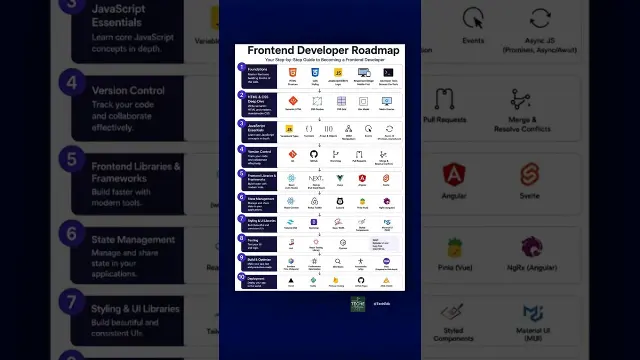 Complete Roadmap to Become a Frontend Developer
Get new #TypeScript ideas by email
Every Thursday: the week's best ideas, with the newest from #TypeScript.
Related tags
TypeScript Guide for Beginners and Developers
TypeScript is a programming language that builds on JavaScript by adding static typing. It was created to help developers write code that is easier to understand, maintain, and debug, especially in larger projects. Because it compiles down to regular JavaScript, TypeScript can run anywhere JavaScript runs, including web browsers and servers.
At its core, TypeScript gives you a way to describe the shape of your data and the behavior of your functions before the code runs. This helps catch many mistakes earlier, during development, instead of finding them later in the browser or in production. It is widely used for web applications, especially when projects grow in size or when many people work on the same codebase.
Why people use TypeScript
TypeScript is popular because it adds structure without removing the flexibility of JavaScript. You still write familiar JavaScript syntax, but you can add types to variables, function parameters, and return values. That extra information can make code easier to read and safer to change.
Read more
It is especially useful when:
- a project has many files or components
- data moves through several layers of the app
- multiple developers need to understand the same code
- you want better editor support, such as autocomplete and error hints
Main ideas to know
The most important TypeScript concept is the type system. Types describe what kind of value something should be, such as a string, number, boolean, array, or object. You can also define custom types to match your own data structures.
A few common ideas include:
- type annotations: adding types to values, parameters, and return values
- interfaces and type aliases: ways to describe object shapes
- unions: allowing a value to be one of several types
- generics: writing reusable code that works with different types
- enums and literal types: defining a fixed set of possible values
You do not need to use every feature at once. Many beginners start by typing simple variables and function arguments, then gradually learn more advanced patterns as needed.
Common styles of use
TypeScript can be used in many kinds of projects, but it is especially common in:
- frontend applications
- server-side JavaScript applications
- shared libraries and component systems
Some teams use it lightly, adding types only where they help most. Others use it more strictly, typing almost everything. Both approaches can work well. The best choice depends on the size of the project and how much guidance the team wants from the type system.
Practical tips for beginners
If you are new to TypeScript, start small. Add types to the parts of your code that handle data, function inputs, and outputs. Let the compiler help you, but do not fight it. When a type error appears, treat it as a clue that something in your logic or assumptions may need attention.
A few good habits:
- prefer clear types over very complex ones
- keep object shapes consistent
- use type inference when the meaning is obvious
- avoid making everything overly strict at first
- use interfaces or types to describe repeated data shapes
TypeScript works best when you use it to support good code organization, not to replace it. Clean naming, small functions, and predictable data flow still matter. Over time, TypeScript can make your codebase easier to grow, review, and maintain.
#TypeScript: frequently asked questions
What is TypeScript, and why would I use it instead of plain JavaScript?
TypeScript is a language that builds on JavaScript by adding static typing, so you can describe the shape of your data and the behaviour of your functions before anything runs. It compiles down to ordinary JavaScript, which means it works wherever JavaScript works, in browsers and on servers alike. The payoff is that many mistakes show up while you are writing code rather than later in production, which matters most once a project grows or several people share the same codebase.
How should a beginner start learning TypeScript?
Start small: add types to the variables and function arguments that carry data in and out of your code, and leave the rest alone at first. Set up the compiler and a configuration file, then treat each type error as a hint about an assumption in your logic rather than as an obstacle to argue with. Advanced features like generics or unions can wait until you actually need them.
Do I have to add types to everything in my code?
No. TypeScript infers types in many obvious situations, so writing them out everywhere just adds noise. Some teams type almost everything for maximum guidance, while others add types only where they clarify data flow, and both approaches can work well. What matters is that the level of strictness suits the size of the project and the habits of the team.
What is the difference between an interface and a type alias?
Both describe the shape of an object, and for many everyday cases either one will do the job. Interfaces are typically preferred when you expect to extend or merge a shape later, while type aliases are handy for unions and other combinations that a single object shape cannot express. Pick one convention and keep it consistent so readers are not constantly switching mental gears.
What mistakes do people usually make when adopting TypeScript?
The most common ones are reaching for an escape hatch that switches type checking off, building types so intricate that nobody can read them, and turning on every strict setting before the codebase is ready. Others keep inconsistent object shapes passing through the app, which defeats much of the benefit. Keep types clear, keep data predictable, and let the type system support good organisation rather than replace it.
Videos come from YouTube and posts from Instagram; titles and summaries are our own. All rights belong to their creators.