 Lessons from Building and Publishing a First iOS App
#App Store
2 ideas
Lessons from Building and Publishing a First iOS App
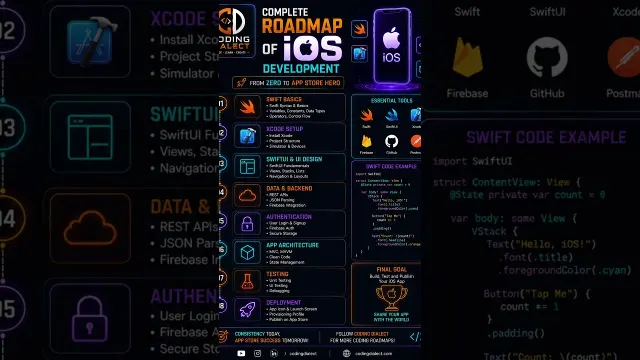 Roadmap for Becoming an iOS App Developer
Get new #App Store ideas by email
Every Thursday: the week's best ideas, with the newest from #App Store.
Related tags
App Store Basics: How App Marketplaces Work
An app store is a digital shopfront where software for phones, tablets and computers is found, installed and kept up to date. You do not download a file from a website and hope for the best: you browse a catalogue, read descriptions, look at screenshots, check ratings, and tap install. The store handles delivery, payment and updates, and the operating system it belongs to decides what is allowed in. An "app store" is simply the general name for that model, whatever platform you are using.
Where it comes from
Before app stores, software arrived on discs or as installers downloaded from scattered websites, and finding something trustworthy was largely a matter of word of mouth. Apple changed the pattern when it opened the App Store for the iPhone in the late 2000s, letting developers publish to a single catalogue that the device owner could search directly. Other platforms built their own equivalents soon afterwards, and the phrase passed into everyday language.
How a store is organised
Read more
- Categories, which sort apps by purpose: photography, productivity, education, health, games and so on.
- Charts, which rank apps by downloads or revenue over a period.
- Search, where the words in an app's title, subtitle and keyword field decide whether anyone finds it.
- Editorial collections, assembled by the store's own team around a theme.
- Ratings and written reviews from people who have installed the app.
- Pricing models: free, paid, free with in-app purchases, or subscription.
What beginners should know
Publishing usually means opening a developer account, agreeing to a set of review guidelines, and submitting a build for approval before it appears in public. The guidelines are worth reading before you write code rather than afterwards, because they cover payments, privacy, content and the way an app is described. A rejection is normally fixable, but each round costs time.
The listing itself is part of the product. The name, subtitle, description, icon and screenshots are what a stranger sees before deciding whether to install, and they need to be accurate: misleading metadata is one of the most common reasons a submission is turned down.
Privacy is treated seriously. Apps that collect data are expected to say what they collect and why, and to ask permission where the platform requires it.
Practical tips
- Check that people actually want the thing before you build it. Search the store for similar apps and read their reviews, especially the critical ones.
- Keep a first release small and reliable. A plain app that does one job without crashing beats an ambitious one that breaks.
- Reply to reviews, politely, including the harsh ones. Other readers see those replies.
- Never buy ratings or reviews. It undermines the trust the whole system runs on, and stores do remove them.
- Update steadily with fixes and small improvements rather than one enormous relaunch.
- Ask for a rating at a moment when the person has just succeeded at something, not on first launch.
None of this guarantees attention. The catalogue is crowded, and discovery is slow and cumulative. What you control is clarity, honesty and whether the app does what its listing promises.
#App Store: frequently asked questions
What is an app store, and how is it different from downloading software from a website?
An app store is a digital shopfront: you browse a catalogue, read descriptions, look at screenshots, compare ratings and tap install, and the store takes care of delivery, payment and updates for you. Downloading from a website puts the responsibility on you to judge whether the file is trustworthy and to keep it current. The general name "app store" describes that catalogue model, whichever platform you happen to use.
What do I need before I can publish an app?
You need a developer account, a finished build to submit, and a genuine willingness to read the store's review guidelines rather than skim them. Those guidelines cover payments, privacy, content and how an app is described, so reading them before you write code saves rounds of rework later. Privacy deserves particular attention: apps that collect data must say what is collected and why, and ask permission where the platform requires it.
How do I choose the right category and positioning for my app?
Start by searching the catalogue for apps that already do something similar and reading their reviews, especially the critical ones, because that tells you what people actually want and where existing tools fall short. Then pick the category that matches the app's purpose rather than the one that looks least crowded, and describe it in plain, accurate terms. The words in your title, subtitle and keyword field decide whether anyone finds you, so they need to be honest as well as clear.
How do I look after an app once it is live?
Update steadily with fixes and small improvements instead of saving everything for one enormous relaunch, and treat the listing itself as part of the product. Reply to reviews politely, including the harsh ones, since other readers see those replies. Ask for a rating at a moment when someone has just succeeded at something rather than on first launch.
What mistakes do people make most often when listing an app?
The most frequent one is misleading metadata: a name, icon, description or screenshot set that promises more than the app delivers, which is also one of the commonest reasons a submission is turned down. Another is buying ratings or reviews, which undermines the trust the whole catalogue depends on and usually gets removed. Building before checking demand, or launching something ambitious that breaks, are close behind.
How can a new app get noticed in a crowded catalogue?
Keep the first release small and reliable, because a plain app that does one job without crashing travels further than an ambitious one that fails. Focus on clarity, honesty and doing exactly what the listing promises, since discovery is slow and cumulative and none of the usual tactics guarantees attention. Category placement, editorial collections and search wording all help, but only once the fundamentals are solid.
Videos come from YouTube and posts from Instagram; titles and summaries are our own. All rights belong to their creators.