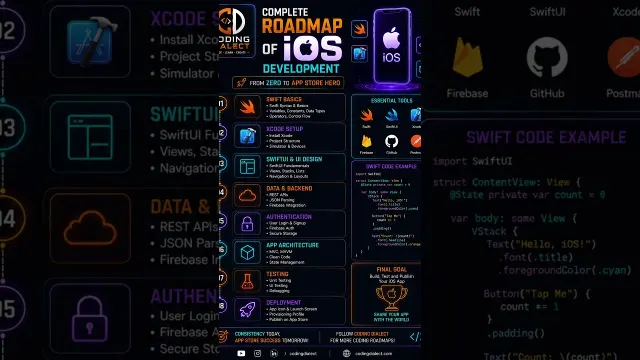
 Roadmap for Becoming an iOS App Developer
#Swift
1 ideas
Roadmap for Becoming an iOS App Developer
Get new #Swift ideas by email
Every Thursday: the week's best ideas, with the newest from #Swift.
Related tags
Swift: A Beginner's Guide to Apple's Programming Language
Swift is a general-purpose programming language created by Apple and used above all to build software for its devices: iPhone and iPad apps, Mac applications, watchOS and tvOS software, and increasingly server-side and command-line tools as well. It is open source and runs on other platforms too, but its centre of gravity is the Apple ecosystem, and that is where most people meet it.
Its predecessor on Apple platforms was Objective-C, an older language that many developers found verbose. Swift was designed as a cleaner replacement: safer, faster to write, and closer to ordinary English. It is a compiled language, so code is translated into machine instructions ahead of time, and it draws on ideas common to modern languages rather than inventing everything from scratch.
What it is used for
- Apps for iPhone, iPad, Mac, Apple Watch and Apple TV
- Interfaces built with SwiftUI or the older UIKit and AppKit frameworks
- Server-side work, scripting and automation
- Teaching, because the syntax is relatively forgiving for newcomers
Read more
How it reads
Swift is statically typed but infers most types for you, so `let name = "Ada"` is enough without declaring that it is a string. Constants are written with `let` and variables with `var`, and the compiler nudges you towards `let`, which keeps code predictable. Semicolons are optional, and the language leans on clear naming over punctuation.
The feature that surprises beginners most is the optional: a type that may or may not hold a value. Swift refuses to let you use a missing value by accident, and you unwrap optionals explicitly. It feels strict at first and becomes one of the reasons Swift code breaks less often in production.
Building interfaces
SwiftUI lets you describe a screen declaratively — you state what should appear for a given state, and the framework updates it. UIKit and AppKit are imperative and older, still present in a great deal of existing code. Starting with SwiftUI is usually kinder, but being able to read UIKit is useful for real projects.
Practical advice for beginners
- Learn the fundamentals first: types, optionals, functions, closures, structs, protocols and enums.
- Write small complete programs rather than following tutorials passively; changing working code teaches more than copying it.
- Expect compiler errors and learn to read them — Swift's messages are unusually descriptive.
- Learn version control early, and get comfortable searching documentation for the exact tools you have installed.
- Keep building tiny apps you would actually use; motivation matters more than a perfect curriculum.
A note on the name
The hashtag also catches an unrelated meaning: SWIFT is the messaging network used by banks for international transfers. If you are here for the programming language, look for posts about Xcode, iOS or app development to stay on topic.
Swift changes over time, with new versions adding features and deprecating old habits, so treat any tutorial as a snapshot and check it against the documentation for the version you are running. The fundamentals — safe types, clear syntax, small well-named pieces of code — stay steady.
#Swift: frequently asked questions
How do I start learning Swift if I've never programmed before?
Begin with the fundamentals rather than a framework: types, optionals, functions, closures, structs, protocols and enums. Then write small complete programs you can actually run and change, because editing working code teaches far more than copying along with a tutorial. Swift's syntax is fairly forgiving for newcomers, which is part of why it's often used for teaching.
What do I need to build apps with Swift?
You need Apple's development tools, which bundle the compiler, editor and simulators in one place. Swift itself is open source and runs on other platforms, so you can experiment with the language almost anywhere, but building software for Apple devices is where it's most at home. Learn version control early and get comfortable searching the documentation for the exact tools you have installed.
Should I learn SwiftUI or the older UIKit first?
SwiftUI is usually kinder to start with, because you describe what a screen should show for a given state and the framework keeps it updated. UIKit and its Mac counterpart are imperative and older, but they still appear in a great deal of existing code. Learning to read those older frameworks is worthwhile once the basics feel comfortable.
What are optionals, and why do they trip up beginners?
An optional is a type that may or may not hold a value, and Swift makes you unwrap it explicitly before use rather than letting a missing value slip through. It feels strict at first, but that strictness is a large part of why Swift software tends to fail less often once it's out in the world. Expect to meet compiler errors here and learn to read them, since the messages are unusually descriptive.
What mistakes should a beginner avoid?
The most common one is following tutorials passively instead of writing and breaking your own small programs. Another is assuming a tutorial is current, since Swift keeps changing and older habits get deprecated over time. Keep building tiny apps you would genuinely use, because motivation carries you further than a perfect curriculum.
What kinds of things can I build with Swift?
Apps for phones, tablets, computers, watches and TV devices, along with command-line tools, scripting, automation and server-side work. You can also use it purely as a learning language while you pick up the ideas behind modern programming. If you're browsing this tag for other reasons, note that it also catches a banking messaging network, so look for posts about app development to stay on topic.
Videos come from YouTube and posts from Instagram; titles and summaries are our own. All rights belong to their creators.