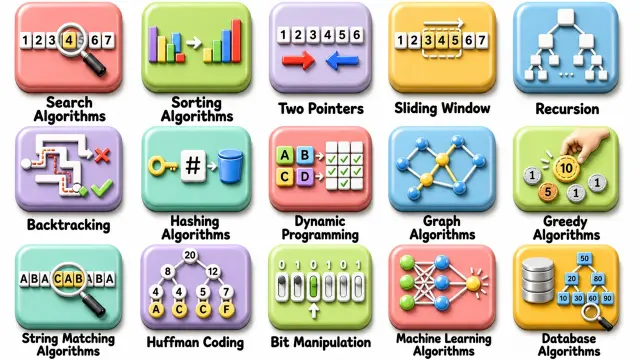
 A Complete Guide to Essential Programming Algorithms Explained Simply
#Coding Tutorial
1 ideas
A Complete Guide to Essential Programming Algorithms Explained Simply
Get new #Coding Tutorial ideas by email
Every Thursday: the week's best ideas, with the newest from #Coding Tutorial.
Related tags
Coding Tutorials for Beginners
What a coding tutorial is
A coding tutorial is a guided lesson that helps you learn how to write computer programs step by step. It can teach you the basics of a language, explain how software works, or show you how to build a small project. Tutorials are useful whether you are completely new to programming or want to strengthen specific skills.
Coding itself is the process of giving instructions to a computer in a language it can understand. Those instructions can be used to make websites, apps, games, automation tools, data programs, and many other kinds of software. Tutorials make this large subject easier by breaking it into small, manageable parts.
Where coding tutorials come from
Read more
Coding tutorials grew alongside programming education and the spread of computers. Early learners often depended on manuals, textbooks, and classroom instruction. Over time, tutorials became available in many formats, from printed guides to interactive lessons and project-based courses. Today, the same basic idea remains: a tutorial helps you understand programming by showing you examples and letting you practice.
Common kinds of tutorials
Coding tutorials can focus on different goals, depending on what you want to learn.
- Beginner tutorials: introduce syntax, variables, data types, loops, conditionals, and functions
- Language tutorials: focus on one programming language and its rules
- Web tutorials: cover HTML, CSS, JavaScript, and how websites are built
- App tutorials: show how to create mobile or desktop applications
- Project tutorials: walk you through building something practical, like a calculator or simple game
- Algorithm tutorials: explain problem-solving methods such as searching, sorting, and recursion
What beginners should know
If you are starting out, it helps to know that programming is less about memorizing everything and more about learning to think clearly and solve problems step by step. At first, errors are normal. Reading error messages is part of the process, not a sign that you are failing.
A good tutorial usually does three things: explains the idea, shows an example, and gives you a chance to try it yourself. Try not to only watch or read. Typing the code yourself helps you understand it more deeply.
Practical tips for learning
- Start with one language instead of jumping between many
- Practice small examples before trying large projects
- Change sample code and see what happens
- Keep notes on common mistakes and new terms
- Revisit topics like loops, functions, and arrays often
- Build simple projects, even if they feel basic
- Take breaks when you get stuck, then return with fresh focus
A good learning mindset
Progress in coding usually comes from steady practice rather than quick memorization. It is normal for your first programs to be simple. Over time, you learn to combine basic ideas into more useful and creative work. The best tutorials encourage curiosity, patience, and repetition.
If you keep experimenting and practicing, coding can become a rewarding skill that grows with you.
Videos come from YouTube and posts from Instagram; titles and summaries are our own. All rights belong to their creators.