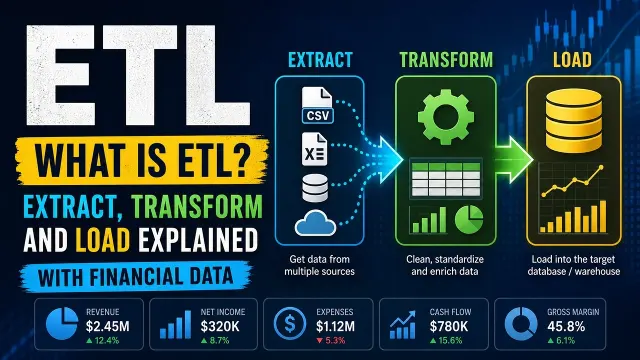
 Understanding ETL Pipelines for Accurate Financial Data
#Data Pipeline
1 ideas
Understanding ETL Pipelines for Accurate Financial Data
Get new #Data Pipeline ideas by email
Every Thursday: the week's best ideas, with the newest from #Data Pipeline.
Related tags
Data Pipelines: A Clear Guide
What a data pipeline is
A data pipeline is the path data follows from one place to another, with steps that collect, move, clean, transform, and deliver it for use. You can think of it as a structured workflow that turns raw data into something useful for reporting, analysis, or another system. Data pipelines are used in many settings, from simple file transfers to large business systems that handle many data sources.
At its core, a pipeline helps data flow in a repeatable way. Instead of copying information by hand, the process is automated so the same steps happen consistently each time. That makes it easier to keep data organized, up to date, and ready for decision-making.
Where data pipelines are used
Read more
Data pipelines are common wherever information needs to move between systems. They may bring data from websites, databases, forms, sensors, applications, or spreadsheets into a central location. From there, the data might be prepared for dashboards, reporting, storage, machine learning, or other internal tools.
Different pipelines serve different purposes. Some are built for batch processing, where data is moved at intervals. Others are designed for near real-time flow, where information is updated continuously or very frequently. The right approach depends on how quickly the data needs to be available and how it will be used.
Main parts of a pipeline
Most pipelines include a few common stages:
- Data collection or extraction: gathering data from one or more sources
- Data transfer: moving it to another system or storage area
- Cleaning: removing errors, duplicates, or missing values where possible
- Transformation: changing the data into a more useful format
- Loading or delivery: placing the finished data where it can be used
Some pipelines are simple, while others include many checks and processing steps. The more important the data, the more careful the design usually needs to be.
Common types and styles
You may hear different terms for pipeline styles. An ETL pipeline extracts data, transforms it, and then loads it. An ELT pipeline extracts data, loads it first, and transforms it later in the target system. Both approaches are widely used, and the choice depends on the tools available and the kind of work being done.
Pipelines can also differ by structure. Some are linear, with one step after another. Others branch, handling different data types in different ways. Some are built to be highly automated, while others include manual review before the final output.
What beginners should know
If you are new to data pipelines, start with clarity about the source, the destination, and the purpose of the data. A good pipeline is not just about moving information; it is about making sure the right data arrives in the right form at the right time.
A few practical habits help a lot:
- Keep the process as simple as possible at first
- Define what counts as valid data
- Add checks for missing or unexpected values
- Make errors visible so they can be fixed
- Document the steps clearly so the pipeline can be maintained later
Good practice for reliable pipelines
A reliable pipeline should be easy to understand, test, and update. It helps to monitor whether data arrives on time and whether the output looks correct. If a step fails, the pipeline should make that failure obvious instead of silently passing bad data along.
It is also wise to design with change in mind. Sources can change, formats can shift, and business needs can evolve. A well-built pipeline allows for those changes without breaking the whole process.
#Data Pipeline: frequently asked questions
How do I get started with a data pipeline if I have never built one?
Begin by being clear about three things: where your data lives now, where you want it to end up, and what you intend to do with it once it arrives. From there, build the simplest version that moves data reliably from source to destination before adding cleaning or transformation steps. Keeping the first version small makes it far easier to spot problems and learn how the flow actually behaves.
What do I need before building a pipeline?
You need access to your data sources, a destination system to hold the results, and a decision about how fresh the data must be. It also helps to define in advance what valid data looks like, so you can tell the difference between a working pipeline and one that quietly passes bad records along. Documenting the steps as you go will save you a lot of guesswork later.
Should I choose an ETL or an ELT style?
The difference comes down to when the transformation happens: ETL changes the data before it lands in the target system, while ELT loads it first and reshapes it afterwards. Which one suits you depends largely on the tools you already have and how much processing power your destination offers. Neither is inherently better, so pick the one that fits your setup rather than the one that sounds more modern.
How do I keep a pipeline running reliably over time?
Make the flow easy to understand, test, and change, and monitor whether data arrives when it should. When a step fails, the pipeline should announce that failure loudly instead of silently passing broken data downstream. Designing with change in mind matters too, since sources, formats, and business needs rarely stay still for long.
What are the most common mistakes beginners make?
The usual culprits are building something complicated too early, skipping validation checks, and letting errors disappear without anyone noticing. Another frequent problem is failing to write down the steps, which makes the pipeline hard to maintain once the original builder moves on. Starting simple and adding checks as you learn avoids most of these issues.
Do I need near real-time updates, or is batch enough?
That depends entirely on how quickly the people or systems using the data need it to be current. Batch pipelines move data at intervals and are simpler to build and reason about, while continuous flows cost more effort and complexity. If nothing downstream depends on minute-by-minute freshness, batch is usually the more sensible starting point.
Videos come from YouTube and posts from Instagram; titles and summaries are our own. All rights belong to their creators.