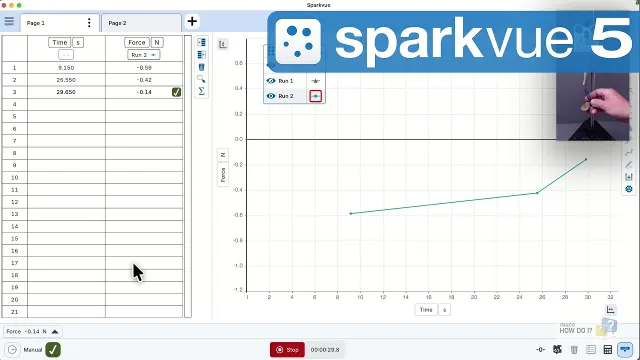
 Recording Discrete Sensor Data Points in Sparkvue
#Sensor Data
1 ideas
Recording Discrete Sensor Data Points in Sparkvue
Get new #Sensor Data ideas by email
Every Thursday: the week's best ideas, with the newest from #Sensor Data.
Related tags
Understanding Sensor Data
What sensor data is
Sensor data is information collected by a device that measures a physical change in the world around it. A sensor can detect things such as temperature, light, motion, pressure, sound, humidity, distance, or position and turn them into data that a person or computer can read. It is used in many everyday settings, from homes and vehicles to factories, laboratories, and wearable devices.
Sensor data is valuable because it helps you observe something continuously or repeatedly without needing to watch it by hand. It can show patterns, changes over time, and small differences that are hard to notice otherwise.
Where it comes from
Read more
Sensor data is produced by sensors, which are tools designed to respond to specific conditions. Some sensors give simple yes-or-no signals, while others produce numbers that change over time. The data may be recorded manually, automatically, or sent directly to software for storage and analysis.
You may work with sensor data in a few common forms:
- Discrete data points, taken at certain moments
- Continuous streams, collected again and again over time
- Averaged or summarized values, which reduce the size of the data
- Raw readings, which are close to the original output of the sensor
Common kinds of sensor data
Different sensors measure different kinds of information. Some of the most common include:
- Environmental data, such as temperature, humidity, air pressure, or light
- Motion data, such as acceleration, rotation, speed, or vibration
- Location data, such as position or distance
- Sound data, such as noise level or audio changes
- Chemical or biological data, such as gas levels, moisture, or body-related signals
The best way to interpret sensor data depends on what the sensor measures and how it is calibrated.
How people use it
Sensor data is useful anywhere measurements need to be tracked, compared, or automated. It can help you monitor conditions, detect changes, trigger actions, or study how something behaves over time. In practice, it is often used for recording experiments, checking environmental conditions, improving safety, or supporting smart devices.
What beginners should know
If you are new to sensor data, start by learning what the sensor is actually measuring. A reading is only useful if you understand its unit, range, and limitations. Always check whether the sensor needs to be calibrated or reset before use.
A few practical tips can help:
- Keep the sensor in the same position when you want comparable readings
- Make sure the measurement conditions are clear and consistent
- Record the time of each reading if the data changes over time
- Watch for unusual spikes or missing values
- Use labels and notes so you can remember what each dataset means
Working with sensor data well
Good sensor data is accurate, consistent, and clearly organized. Even simple measurements become more useful when they are named properly and stored in a way that makes them easy to review later. If you are collecting data for a project, focus on clear setup, careful recording, and a basic understanding of what the numbers can and cannot tell you.
Sensor data is most helpful when you treat it as part of a bigger picture: the sensor, the conditions around it, and the purpose of the measurement all matter.
#Sensor Data: frequently asked questions
What is sensor data, in plain terms?
It is the information a device gathers when it measures a physical change around it — light, heat, movement, pressure, sound — and turns that measurement into something a person or a computer can read. The appeal is that the sensor keeps watching for you, so patterns and small shifts show up that you would otherwise miss by eye.
How do I get started with sensor data as a beginner?
Begin by pinning down what your sensor actually measures and what unit it reports, since a reading on its own tells you very little. Confirm whether it needs calibrating or resetting before you trust it, then take a simple set of readings and write down the conditions you took them under.
Which kind of sensor data should I pick for a project?
Choose by the question you want answered rather than by whatever sensor is closest to hand — environmental data for temperature, humidity or light, motion data for movement and vibration, location data for position and distance. Then decide whether raw readings, a continuous stream or summarized values suit you better, because that decision shapes how much sorting and interpretation the project will need.
How do I care for a sensor so its readings stay trustworthy?
Keep it clean, use it within the conditions it was built for, and put it back in the same position each time you want comparable results. Store it somewhere safe when it is not in use and check it occasionally against a known condition, since a sensor that has drifted quietly will keep producing confident-looking data.
What mistakes do people make when collecting sensor data?
Frequent ones are shifting the sensor between readings meant to be compared, changing the surroundings without noting it, and brushing past spikes or blank spots instead of asking what caused them. Another is treating one reading as the whole story — the number only makes sense alongside the sensor, the conditions, and the reason you measured in the first place.
How should I label and store sensor data so it stays usable?
Name each dataset clearly, record the unit and the conditions it was captured under, and note the time whenever the value changes over the run. Simple consistent notes feel tedious at the moment but make all the difference when you return to compare datasets or hand a project on to someone else.
Videos come from YouTube and posts from Instagram; titles and summaries are our own. All rights belong to their creators.