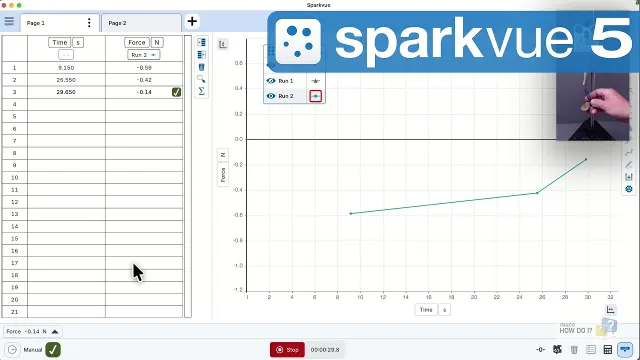
Recording Discrete Sensor Data Points in Sparkvue
A guide on how to record sensor data points on demand using manual sampling mode in Sparkvue 5.
YouTube · PASCO How Do I? · 28 October 2026 Watch on YouTube
Tried this idea? Show how yours turned out.
I made thisHow to do it
What you need
- Sparkvue 5
- sensor
- manual sampling mode
- data table or graph
Step by step
- Open Sparkvue and connect the sensor.
- Switch to manual sampling mode.
- Choose the page or run where you want to record data.
- Press the record/collect control when you want a point saved.
- Repeat the manual recording each time you want a new data point.
- Review the saved points in the table or graph.
Tips
- Use manual mode for data points at times you choose, not continuous recording.
- Keep the sensor ready before pressing record so each point is captured when desired.
- Check the table after each point to confirm it was saved.
Written by Tagrazzi from the original's description and photo.
The title and summary are written by Tagrazzi; the video belongs to its creator and plays from YouTube.










Comments (0)
No comments yet. Be the first to comment.
Sign in to write a comment.