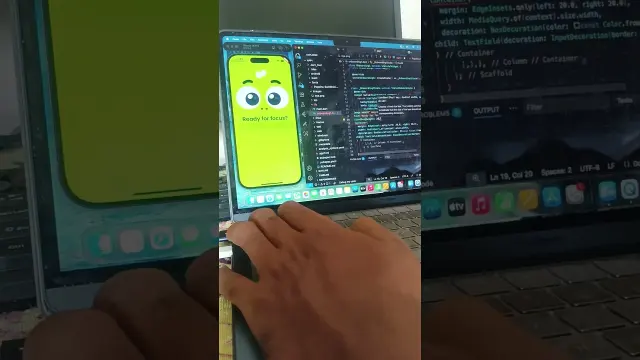
Flutter Tutorial Building an App from Scratch with Firebase
A beginner-friendly walkthrough that builds a complete Flutter and Firebase project, covering setup and the core development steps in order.
YouTube · Shivam Gupta · 8 September 2026 Watch on YouTube
Tried this idea? Show how yours turned out.
I made this#Flutter #Firebase #FlutterTutorial #FlutterForBeginners #AppDevelopment #FlutterApp #FlutterProject #LearnFlutter
How to do it
What you need
- Flutter SDK
- Firebase project
- code editor
- iOS simulator or Android emulator
- terminal
Step by step
- Install the Flutter SDK and confirm it runs from the terminal
- Create a new Flutter project
- Set up a Firebase project for the app
- Connect the Flutter app to Firebase
- Build the app screens and widget layout in Dart
- Run the app on a simulator or emulator and check the result
- Fix any errors shown in the terminal output and run it again
Tips
- Keep the simulator open beside your editor so you see each change as you save it
- Follow the build in the same order as the tutorial, since each step depends on the one before
- Read the terminal output when the run fails — it points to the file and line to fix
Written by Tagrazzi from the original's description and photo.
The title and summary are written by Tagrazzi; the video belongs to its creator and plays from YouTube.


Comments (0)
No comments yet. Be the first to comment.
Sign in to write a comment.