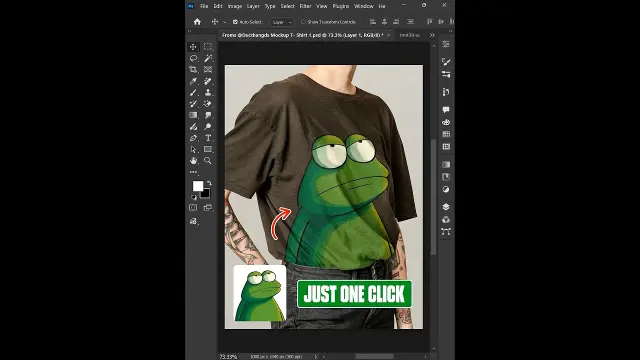
 Using Photoshop AI Generative Fill to Create a T-Shirt Mockup
#T-Shirt Mockup
1 ideas
Using Photoshop AI Generative Fill to Create a T-Shirt Mockup
Get new #T-Shirt Mockup ideas by email
Every Thursday: the week's best ideas, with the newest from #T-Shirt Mockup.
Related tags
T-Shirt Mockup Guide: Make Your Designs Look Real
A t-shirt mockup is a way of showing a design on a shirt before anything is printed. Instead of photographing a finished garment, you place your artwork onto a blank shirt — real or rendered — so that clients, customers or collaborators can see how the finished piece would look. It sits somewhere between a sketch and a product photo: close enough to feel real, cheap enough to change a hundred times before you commit.
The idea comes out of design studios and print shops, where presenting a design on a flat page rarely convinces anyone. Clients want to see the thing on a body. Early mockups were physical: a blank shirt, a printed transfer, a camera. Software made it faster, and the practice spread to anyone selling prints online or pitching a clothing idea. Today the mockup is a standard part of a designer's toolkit, used for portfolios, online listings, social posts and client presentations.
The main kinds
- Flat lay: the shirt photographed or rendered from directly above on a plain surface. Clean, easy to read, good for catalogues.
- Ghost or invisible mannequin: the shirt holds a body shape with no visible wearer. Formal and neutral.
- On-model: a person wearing the shirt, posed in a studio. Gives a sense of fit, drape and proportion.
- Lifestyle: worn in a real setting, outdoors or in a room. Warmer and more evocative, but harder to keep neutral.
- Close-up detail: a tight crop on the print, collar or hem, useful to show texture and stitch quality.
Read more
What makes a mockup convincing
The single most common mistake is treating the shirt like a sheet of paper. Fabric curves, folds and stretches, and artwork that ignores this looks stuck on. If your design crosses a fold, the fold should bend it. If the shirt is lit warmly, the print should share that warmth.
Watch the light. A design pasted at full brightness onto a shadowed shirt reads as a sticker. Matching your artwork's contrast and colour temperature to the surface underneath does more for realism than any amount of extra detail.
Respect the print method. Different methods behave differently on cloth: some sit thick on the surface, some soak into the fibres, some fade slightly with the weave. A soft, slightly broken look suits fabric prints better than a razor-sharp edge, and a print on a dark shirt usually needs a light underlayer that subtly shows through.
Keep your artwork sharp and your scale honest. A common beginner habit is stretching a small file to fill the shirt, which softens edges and distorts proportions. Cheaper still: measure roughly how wide the print would be on a real garment and hold to it.
Finally, be careful with stock templates. A blank shirt in a heavily styled room can overpower the design you are trying to present. Choose a backdrop that lets the garment speak.
Start simple: a plain flat lay and one on-model shot will cover most of what you need. Skill in mockups is mostly patience with light and fabric — and both improve quickly with practice.
#T-Shirt Mockup: frequently asked questions
How do I make a t-shirt mockup if I'm not a designer?
Start with a blank shirt photo or template and drop your artwork onto it in any editor that supports layers, then adjust it to follow the fabric instead of sitting flat. Practicing with a plain flat lay first teaches you the basics without the complications of folds, models or settings.
What do I need before I can create a mockup?
You need your artwork at a good resolution and a blank shirt image, either a photo you took or a template you are allowed to use. After that, it is mostly a matter of matching brightness, colour and scale so the design belongs on the garment.
Which kind of mockup should I choose?
Pick by what you are trying to show: a flat lay or ghost mannequin for catalogues and clean listings, on-model when fit and drape matter, and lifestyle shots when you want atmosphere. A close-up is worth adding when texture or stitch quality is the selling point.
How do I keep a mockup from looking fake?
The main thing is to treat the shirt as fabric, not paper — let folds bend the design, and match its contrast and warmth to the lighting on the shirt. Scale matters too: measure roughly how wide the print would sit on a real garment rather than stretching the file to fill the space.
What are the most common t-shirt mockup mistakes?
Pasting artwork at full brightness onto a shadowed shirt, stretching a small file until the edges soften, and ignoring how the print method actually behaves on cloth. Another frequent one is choosing a busy styled backdrop that competes with the design instead of letting the garment speak.
How should I care for printed t-shirts shown in a mockup?
It is worth reflecting real care in how you present the design, since buyers will expect the print to hold up with washing. Washing cool and inside out, avoiding harsh heat on the print area and drying gently all help printed fabric keep its look.
Videos come from YouTube and posts from Instagram; titles and summaries are our own. All rights belong to their creators.