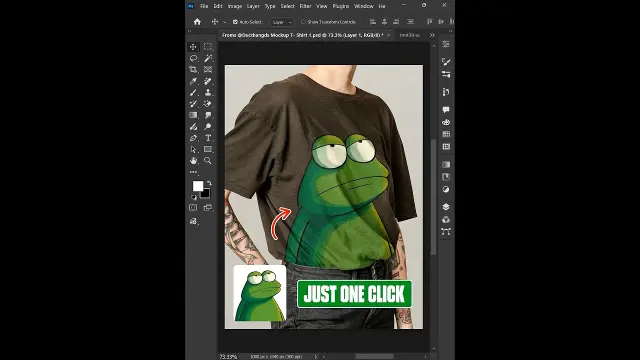
Using Photoshop AI Generative Fill to Create a T-Shirt Mockup
Quick tip demonstration on leveraging Adobe Photoshop AI Generative Fill to produce a custom t-shirt mockup.
YouTube · DucThang Ds · 23 June 2026 Watch on YouTube
Tried this idea? Show how yours turned out.
I made thisHow to do it
What you need
- Adobe Photoshop
- t-shirt photo
- design image
- selection tool
- Generative Fill
Step by step
- Open the t-shirt photo in Photoshop.
- Select the shirt area you want to replace or mock up.
- Use Generative Fill to place the design onto the shirt.
- Adjust the result so the graphic follows the shirt folds.
Tips
- Use a shirt photo with clear lighting and visible folds.
- Make the selection follow the shirt shape for a cleaner mockup.
- Refine the placement if the graphic does not sit naturally on the fabric.
Written by Tagrazzi from the original's description and photo.
The title and summary are written by Tagrazzi; the video belongs to its creator and plays from YouTube.
Comments (0)
No comments yet. Be the first to comment.
Sign in to write a comment.