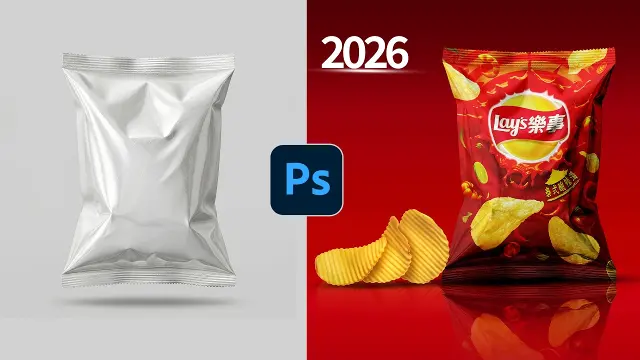
Easy Method for Designing Realistic Packaging Mockups in Photoshop
Learn smart layering, perspective handling, and lighting tricks to turn flat packaging designs into realistic store-ready mockups.
YouTube · grapexels · 3 June 2026 Watch on YouTube
Tried this idea? Show how yours turned out.
I made this#packagedesign #graphicdesign #photoshop #grapexels
How to do it
What you need
- Photoshop
- plain packaging mockup file
- flat packaging design artwork
- product photo or texture for blending
- background image
Step by step
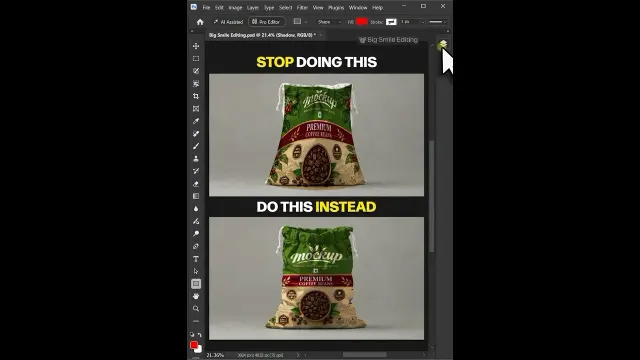
- Place the flat design over the mockup in a smart object layer
- Match the design to the bag's shape with perspective transform
- Blend texture so the artwork follows the creases and folds
- Add highlights and shadows to match the scene lighting
- Add a background and reflection to finish the scene
Tips
- Keep the design on its own smart object layer so you can swap artwork without redoing the mockup
- Blend texture over the artwork so it doesn't look pasted flat onto the bag
- Match highlights to the mockup's existing light direction for realism
Written by Tagrazzi from the original's description and photo.
The title and summary are written by Tagrazzi; the video belongs to its creator and plays from YouTube.
Comments (0)
No comments yet. Be the first to comment.
Sign in to write a comment.