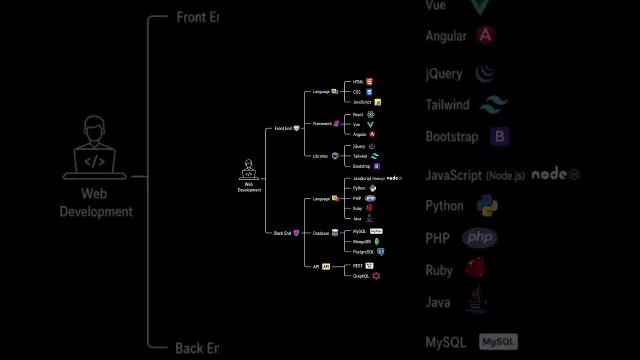
 Web Development Roadmap for Beginners: Frontend and Backend
#Web Development Roadmap
1 ideas
Web Development Roadmap for Beginners: Frontend and Backend
Get new #Web Development Roadmap ideas by email
Every Thursday: the week's best ideas, with the newest from #Web Development Roadmap.
Related tags
Web Development Roadmap: A Path You Can Follow
A web development roadmap is simply a plan: an ordered list of the skills and concepts that take someone from "I don't know where to start" to "I can build and ship things." There is no single official roadmap, and nobody enforces one. What a good roadmap does is turn an overwhelming field into a sequence you can work through, one step at a time.
What a roadmap is for
Web development touches many things at once — markup, styling, programming, data, servers, deployment — and beginners usually meet all of them in the same week. That is why so many people stall. A roadmap separates the layers, tells you what genuinely comes first, and gives you permission to ignore the rest for now. It is a map, not a curriculum you must finish before you are allowed to be curious.
The foundations
Read more
Everything on the web is built on three ideas: structure, presentation and behaviour. Structure means HTML, the markup that says what each part of a page is — a heading, a paragraph, a list, a form. Presentation means CSS, which decides how that structure looks and how it adapts to different screens. Behaviour means JavaScript, the programming language that runs in the browser and makes a page respond to the person using it.
Learn HTML and CSS first, properly, including how layout works and how pages flex across screen sizes. Then take JavaScript slowly. Variables, functions, arrays, objects and the idea of working with data will carry you a long way, and they matter far more than memorising syntax tricks.
Tools that grow with you
Somewhere early, learn version control — the habit of tracking changes to your code and being able to go back. Alongside it, get comfortable with your browser's developer tools and the command line. These are quiet skills; they rarely look impressive and they save you constantly.
Frontend, backend, and the line between them
The frontend is everything that runs in the browser. The backend runs on a server: storing data, checking who is allowed to do what, and answering requests. Between them sits a simple contract — the request and its response — and understanding that contract is often the moment the whole field clicks into place. Once you know how data travels, frameworks and libraries become conveniences rather than mysteries.
Practical advice for beginners
- Build small complete things rather than large unfinished ones. A working page beats a half-built app.
- Repeat a project with a twist instead of following a new tutorial forever. Rebuilding from memory is where learning happens.
- Read the official documentation of whatever you use; it is usually better than any summary.
- Resist collecting tools. Choose one way to do something, learn it well, and swap later if you need to.
- Expect debugging to take most of your time. That is not failure, it is the job.
A note on pace
Roadmaps invite comparison, and comparison invites discouragement. Progress in this field is uneven and mostly invisible from the inside. Pick the next step, finish it, and let the roadmap stay a rough guide rather than a scoreboard.
#Web Development Roadmap: frequently asked questions
How do I start learning web development when I have no experience at all?
Begin with the markup and styling that every page is made of, and get comfortable building simple static pages before touching anything else. Once you can put a page together and make it adapt to different screen sizes, move on to a programming language that runs in the browser. Starting here keeps the first weeks concrete instead of abstract.
Which should I learn first, frontend or backend?
Almost everyone is better off starting on the frontend, because you can see your work immediately and get feedback without any server setup. The backend only becomes meaningful once you understand how a request travels out and a response comes back. Learn the browser side until it feels natural, then follow the data.
What tools do I actually need, and do I need to pay for anything?
A code editor, a browser, and a way to keep track of changes to your files will take you a long way, and the free options in each category are genuinely good. Resist the urge to install everything you see mentioned; a small set of tools you know well beats a large set you barely use. Add something new only when a real problem calls for it.
Is it better to follow tutorials or build my own projects?
Tutorials are useful for meeting a concept, but the learning happens when you close the tab and rebuild the thing from memory with your own twist. Aim for small projects you can actually finish rather than an ambitious one that stays half-done. A working page you shipped teaches more than a perfect plan you never completed.
How long does it take to become job-ready, and how should I pace myself?
There is no honest fixed answer, because progress depends on how much time you can put in and how you practise it. What matters more is consistency and finishing what you start, rather than measuring yourself against someone else's timeline. Treat the roadmap as a rough guide, not a scoreboard.
What are the most common beginner mistakes?
Hoarding tools and switching stacks before learning one properly is the classic trap, and so is endlessly starting new tutorials instead of finishing anything. Another common one is treating debugging as evidence of failure rather than as a normal part of the work. Reading the official documentation of whatever you use usually saves you from all three.
Videos come from YouTube and posts from Instagram; titles and summaries are our own. All rights belong to their creators.