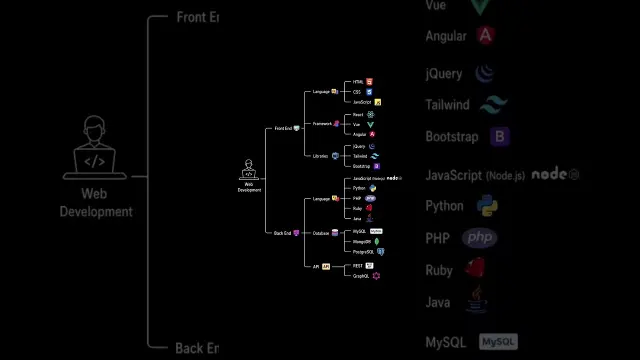
 Web Development Roadmap for Beginners: Frontend and Backend
#Web Technologies
1 ideas
Web Development Roadmap for Beginners: Frontend and Backend
Get new #Web Technologies ideas by email
Every Thursday: the week's best ideas, with the newest from #Web Technologies.
Related tags
Web Technologies: A Beginner's Guide to the Web
Every time you open a page, fill in a form or send a message, a set of technologies cooperates behind the scenes. Web technologies are the languages, protocols and tools used to build and deliver content over the internet. They are not a single product or standard but a family of open specifications that browsers, servers and developers all agree to follow — which is precisely why the web works across devices, operating systems and countries.
How the web is put together
The story usually starts with three fundamentals. HTML gives a page its structure: headings, paragraphs, images, links. CSS controls presentation — colours, spacing, layout, how things reflow on a small screen. JavaScript adds behaviour, letting a page respond to clicks, validate input or fetch new data without a full reload. Together they form the frontend, the part that runs in your browser.
On the other side sits the backend: the server-side programs that store data, check who is allowed to do what, and produce the responses the browser receives. Between the two, HTTP defines how requests and responses are phrased, and URLs define how resources are addressed. A domain name is translated into a network address by the domain name system, and encryption via HTTPS protects the connection in transit.
Read more
Frontend and backend in practice
Frontend work is concerned with accessibility, performance and responsive design — making sure a page is usable with a keyboard, readable on a slow connection, and sensible on screens of any size. Frameworks and component libraries exist to organise larger interfaces, but they rest on the same three fundamentals; learning those first makes any tool easier to pick up.
Backend work involves a server-side language, a database, and the logic that ties them together. Common patterns include rendering pages on the server, exposing data through APIs that the frontend consumes, and separating concerns so that storage, business rules and presentation can change independently. Terms you will meet early — routing, authentication, caching, sessions — describe ordinary problems: which code handles which address, how a site remembers you, and how to avoid repeating expensive work.
What beginners should know
Start with HTML, CSS and JavaScript, and build small things: a page about a subject you like, a form, a simple to-do list. Learn to read the browser's developer tools, which show the structure of a page, its styles, its network requests and any errors. Understand the request-and-response cycle early; much of web development becomes clearer once you can picture what travels between browser and server.
Practical habits help more than a long list of technologies. Keep files organised, use version control for your work, and read documentation rather than relying only on tutorials. Prefer understanding over memorising, and expect to revisit the basics repeatedly — most experienced developers still do.
Finally, treat the web as a public place. Think about privacy, about who owns the content you publish, and about people who browse with assistive technology or limited bandwidth. Good web craft is not only about making something appear; it is about making it work for whoever arrives.
#Web Technologies: frequently asked questions
How do I get started with web technologies if I have never built anything before?
Begin with the fundamentals that every page rests on: HTML for structure, CSS for presentation, and JavaScript for behaviour. Build small, complete things — a page about a subject you enjoy, a contact form, a simple list you can add to — rather than trying to absorb everything at once. Learning to read your browser's developer tools alongside these first projects makes the feedback loop much faster.
What do I actually need in order to build and run a website?
At minimum you need a text editor, a browser, and an understanding of how files are organised into a project. Everything else — a server, a database, a framework — is optional until your project needs to store data, authenticate people, or serve many visitors. Starting with plain files opened locally keeps the moving parts visible while you learn.
Should I focus on frontend or backend first?
Frontend is usually the friendlier entry point, because you can see the result of your work immediately in the browser and the fundamentals transfer to any later tool. Backend makes more sense once you can picture the request-and-response cycle and want to work with stored data and access rules. Whichever you pick, the other side becomes much easier to learn afterwards.
How do I keep a site healthy after it launches?
Treat maintenance as part of the work: keep dependencies current, check that pages still load quickly, and confirm the site remains usable with a keyboard and on a small screen. Reviewing what your developer tools report — failed requests, console errors, slow resources — catches most problems before visitors notice them. Backups and version control turn a mistake from a disaster into a small correction.
What kinds of projects are good practice for a beginner?
Choose projects where you can actually use the result: a page collecting recipes you cook, a form that gathers feedback from friends, a small gallery of photos you have taken. Each one naturally teaches structure, styling and behaviour, and gives you a reason to add a feature later. Rebuilding the same project after learning something new is one of the most effective exercises there is.
What mistakes do people new to web technologies make most often?
The common ones are chasing frameworks before the basics feel solid, memorising syntax instead of understanding why something works, and copying tutorials without adapting them to a problem of your own. Another frequent slip is ignoring accessibility and slow connections until the end, when they are far harder to fix. Reading documentation directly, and keeping your files tidy from the start, prevents a surprising amount of this.
Videos come from YouTube and posts from Instagram; titles and summaries are our own. All rights belong to their creators.