 What Q-Day Means for Encryption and Everyday Digital Privacy
#Encryption
2 ideas
What Q-Day Means for Encryption and Everyday Digital Privacy
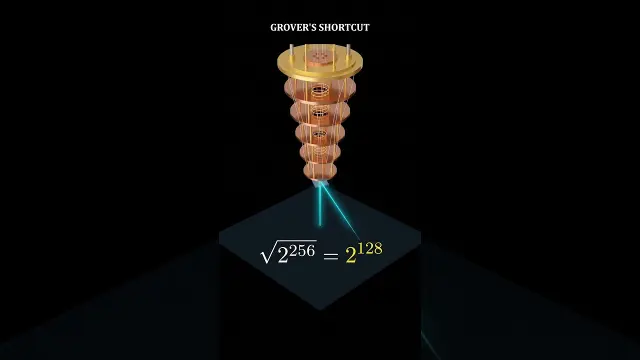 Can Quantum Computers Break 256-Bit AES? Grover's Algorithm
Get new #Encryption ideas by email
Every Thursday: the week's best ideas, with the newest from #Encryption.
Related tags
Encryption Explained: How Secrets Stay Secret
Encryption is the practice of scrambling information so that only someone holding the right key can read it again. It is one of the quiet foundations of modern life: every time you buy something online, send a message, or open a banking app, encryption is doing the work in the background. Understanding the basic ideas helps you make better choices about the tools you use, without needing to be a mathematician.
From substitution to mathematics
People have hidden messages for as long as they have written them. Ancient and medieval ciphers usually swapped letters according to a rule — shift each letter a few places along the alphabet, for instance. These methods share a weakness: the rule is the secret, and once someone works out the rule, every message in that system falls. Modern encryption changed the emphasis. The method can be published and studied by anyone; the secrecy lives in a key, a piece of data you keep private.
Symmetric encryption
Read more
In symmetric encryption, the same key both locks and unlocks the message. It is fast and well suited to large amounts of data, such as a disk or a file. Its weak point is distribution: if you want to talk securely with someone new, you need a way to get the key to them without an eavesdropper seeing it. Most practical systems solve this by using asymmetric encryption briefly to agree on a shared key, then switching to the faster symmetric method.
Asymmetric encryption
Asymmetric, or public-key, encryption uses a matched pair: a public key anyone may see, and a private key you keep. Something encrypted with the public key can only be opened with the private one. This also underlies digital signatures, which let you verify that a message came from the holder of a particular private key and was not altered on the way. The trade-off is speed — public-key operations are costly, so they are used for small things like key exchange and signatures rather than bulk data.
Keys, hashing and everyday use
Encryption appears in two broad settings. In transit, protocols such as TLS protect data moving between your browser and a server. At rest, full-disk and file-level encryption protect data sitting on a device, which matters most if the device is lost or stolen. A related but distinct tool is hashing: a one-way function that turns data into a fixed-length fingerprint. Hashes verify integrity and store passwords, but they are not encryption, because there is no key to reverse them.
Where beginners go wrong
Three habits cause most trouble. First, confusing encoding with encryption — converting text to base64 or another representation hides nothing. Second, building your own scheme; well-examined, standard algorithms beat clever inventions almost every time. Third, neglecting key management: a strong cipher with a weak, reused or carelessly stored key gives little protection. Passphrase-protected key stores, backups kept separately from the data they unlock, and a password manager all help.
A note on the future
Large-scale quantum computing is an active area of research, and it has prompted work on new algorithms designed to resist it. Grover's algorithm, for example, offers a quadratic speedup for searching, which effectively reduces the security margin of symmetric ciphers and argues for longer keys. Standard bodies have been preparing post-quantum options, and well-designed systems are built to swap algorithms over time.
Practical starting points
Prefer well-known tools with sensible defaults. Turn on full-disk encryption where offered. Look for the padlock and a valid certificate, but remember it proves a connection is encrypted, not that the site is honest. Keep software updated, use long unique passphrases, and back up your keys — losing a key is often the same as losing the data.
#Encryption: frequently asked questions
How do I start with encryption if I'm not technical?
Begin with what your devices already offer: switch on full-disk encryption, use messaging and browsing tools that encrypt by default, and let software handle the keys for you. You don't need to follow the mathematics to benefit from it — you need a few reliable habits and a willingness to leave the defaults alone.
What do I actually need to keep safe — a password or a key?
The key is the thing that makes your data readable again; a password is usually just what unlocks a stored key. So make the passphrase long and unique, and keep a backup of the key or recovery material somewhere separate from the data it opens. If the only copy is lost, the data is effectively gone.
Should I choose symmetric or public-key encryption?
In practice you rarely pick one — working systems use public-key methods briefly to agree on a shared secret, then switch to the faster symmetric cipher for the bulk of the data. Choose your tool by what you're protecting instead: whole-disk or file-level encryption for data sitting on a device, an encrypted connection for data moving between you and a service.
How should I look after my keys over time?
Keep passphrases in a password manager rather than in your head or on a sticky note, and store key backups somewhere apart from the data they unlock. Replace keys when a device goes missing or someone who had access moves on, and never reuse one passphrase across everything. Losing a key is usually the same as losing the files.
What mistakes do beginners make most often?
The commonest is confusing encoding with encryption: reformatting text into another representation hides nothing, because anyone can reverse it without a key. The second is inventing your own scheme, when well-examined standard algorithms are almost always stronger. The third is careless key handling — a strong cipher behind a weak, reused or badly stored key protects very little.
Does the arrival of quantum computing mean my encryption is already useless?
Large-scale quantum machines remain a research problem, but the concern is taken seriously enough that standards bodies have been preparing replacement algorithms for years. Well-designed systems are built so the algorithm can be swapped out without rebuilding everything, so the practical response is to keep your software current and pick tools that are actively maintained.
Videos come from YouTube and posts from Instagram; titles and summaries are our own. All rights belong to their creators.