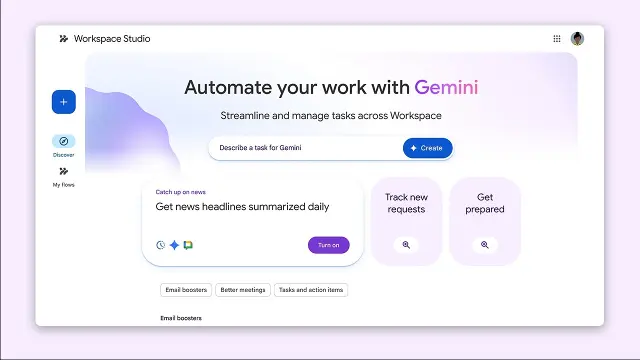
 Getting Started with Key Components of Google Workspace Studio
#Workflows
1 ideas
Getting Started with Key Components of Google Workspace Studio
Get new #Workflows ideas by email
Every Thursday: the week's best ideas, with the newest from #Workflows.
Related tags
Workflows: Organizing Tasks and Processes
Workflows are the step-by-step paths that help you move a task from start to finish in a clear, repeatable way. They are used in offices, studios, homes, and creative businesses to reduce confusion, save time, and make work more consistent. A good workflow answers a simple question: what happens next?
What a workflow is
At its core, a workflow is a sequence of actions. One step leads to another, whether you are collecting information, approving a request, creating a design, or publishing content. Some workflows are very simple, like sorting laundry or planning a meal. Others are more structured, with multiple people involved and decisions made along the way.
Workflows are often used to make sure important tasks do not depend on memory alone. When the process is written down or mapped out, it becomes easier to repeat, improve, and hand over to someone else.
Read more
Common kinds of workflows
There are many types of workflows, depending on what you are trying to do:
- Sequential workflows, where each step happens in a fixed order
- Parallel workflows, where several tasks can happen at the same time
- Approval workflows, where someone must review or confirm before the next step
- Creative workflows, used for writing, design, photography, or other project-based work
- Personal workflows, used for routines, planning, or household organization
Some workflows are very rigid, while others leave room for judgment and flexibility. The right balance depends on the task.
Why workflows are useful
Workflows help you stay organized and make your process easier to follow. They can reduce missed steps, avoid duplicated effort, and make collaboration smoother. When everyone understands the process, there is less guesswork and fewer delays.
They are also helpful when you want to improve how something is done. If a task feels messy or slow, mapping the workflow can show where things get stuck, where steps are unnecessary, or where information is getting lost.
How to build a simple workflow
If you are creating a workflow for the first time, start small.
- Define the goal clearly
- List the main steps in order
- Decide who is responsible for each step
- Note any decision points or approvals
- Keep the process as simple as possible
- Test it with a real task and adjust if needed
A workflow should support the work, not complicate it. If it is too detailed, people may stop using it. If it is too vague, it will not be very useful.
Practical tips for beginners
Begin with one recurring task, such as responding to inquiries, organizing files, or preparing a project brief. Write the steps in plain language. If possible, use a visual layout like a checklist or diagram so the process is easy to follow at a glance.
It also helps to review your workflow from time to time. A process that works well today may need a few changes later as your needs grow or your team changes. The best workflows are clear, flexible, and easy to repeat.
#Workflows: frequently asked questions
How do I start building my first workflow?
Pick one task you repeat often and write down the steps in the order they actually happen, in plain language. Keep the list short and test it on a real example before adding anything else. Starting small makes the process easier to follow and easier to fix later.
What do I need before mapping out a workflow?
You mainly need a clear goal and an honest picture of how the task is done today, including who handles each part. A checklist, a notebook page, or a simple diagram is enough to begin; no special software is required. Knowing where decisions or approvals happen matters more than having polished tools.
Which type of workflow should I choose?
It depends on whether your steps must happen in a fixed order, can run side by side, or need someone to sign off before moving on. Sequential flows suit predictable tasks, parallel ones suit independent jobs, and approval flows suit anything where a review is required. Personal routines can stay loose, while shared work usually benefits from more structure.
How do I keep a workflow from becoming too complicated?
Write only the steps that genuinely change the outcome, and leave out detail people already know. A workflow that is too detailed tends to get ignored, while one that is too vague gives no real guidance. Review it after a few uses and cut anything that slows the work down.
How often should I revisit a workflow once it is in use?
Look at it again whenever the work feels slow, messy, or when the people involved change. Mapping the process again quickly shows where things get stuck or where information is getting lost. Small adjustments made regularly keep a workflow useful instead of outdated.
What mistakes do beginners usually make with workflows?
The most common ones are trying to document everything at once, skipping the test run, and never assigning responsibility for each step. Others copy a complex process from elsewhere instead of describing their own actual work. Keeping the flow simple, owned, and tested avoids most of these problems.
Videos come from YouTube and posts from Instagram; titles and summaries are our own. All rights belong to their creators.