How to Calculate Balanced Corner Radiuses in Interfaces
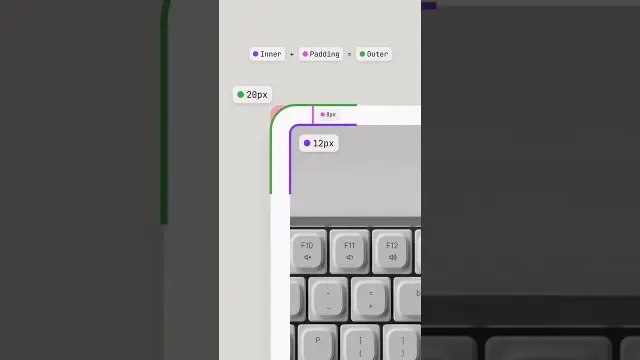
A simple mathematical formula using inner radius and padding to ensure nested elements look visually balanced.
YouTube · Memorisely · 1 April 2026 Watch on YouTube
Tried this idea? Show how yours turned out.
I made thisHow to do it
What you need
- Design tool (Figma, CSS, etc.)
- Inner corner radius value
- Padding value between the nested elements
Step by step
- Set the inner element's corner radius first.
- Measure the padding between the inner and outer element.
- Add the inner radius and the padding together.
- Apply that sum as the outer element's corner radius.
- Adjust for tight, regular or loose padding and repeat the sum each time.
Tips
- A fixed outer radius breaks as soon as you change padding; recalculate it instead.
- The example shown works out as 12px inner radius plus 8px padding equals a 20px outer radius, so the curves stay parallel.
- Keep the inner radius small relative to the outer element so the shapes nest without looking lopsided.
Written by Tagrazzi from the original's description and photo.
The title and summary are written by Tagrazzi; the video belongs to its creator and plays from YouTube.











Comments (0)
No comments yet. Be the first to comment.
Sign in to write a comment.