 12 Practical Google Workspace Studio Workflow Ideas for Business
#Automation
8 ideas
12 Practical Google Workspace Studio Workflow Ideas for Business
 Building Custom AI Agents in Workspace Studio Using Plain Language
 Google Workspace Studio Tutorial: Five Copyable AI Workflows
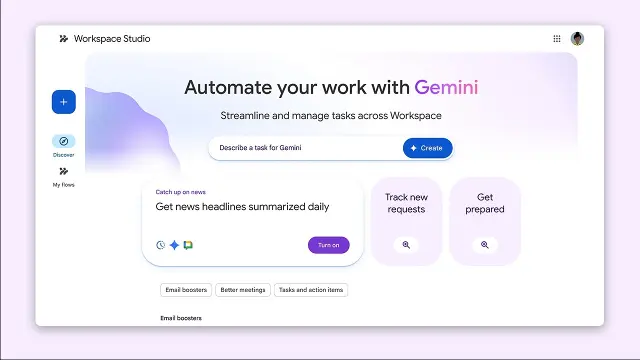 Getting Started with Key Components of Google Workspace Studio
 Google Workspace Studio Tutorial: Automating Gmail and Drive
 Google Workspace Update: Automating Tasks with Gemini Skills
 Advanced Google Workspace Studio Tutorial and Productivity Tips
 Inside Google Workspace Studio: How to Build Custom Workflows
Get new #Automation ideas by email
Every Thursday: the week's best ideas, with the newest from #Automation.
Related tags
Automation: A Practical Guide to Repetitive Tasks
What automation means
Automation is the use of tools, rules, or machines to carry out tasks with little or no repeated manual effort. In everyday life, it can mean something as simple as a light that turns on automatically, or something more complex, like a workflow that moves information between apps, sends reminders, or sorts files for you. The basic idea is to reduce repetitive work so you can focus on decisions, creative tasks, and exceptions.
Automation has been part of industry for a long time, especially in manufacturing, where machines were used to make work faster, steadier, and less dependent on constant human action. Over time, the same principle spread into offices, homes, and digital systems. Today, automation is used in many settings, from scheduling and email handling to home routines and data management.
Common kinds of automation
Read more
There are several broad kinds of automation:
- Task automation: small actions that happen automatically, such as moving a file, copying information, or sending a standard reply.
- Workflow automation: a chain of steps that runs in order, often moving information from one place to another.
- Rule-based automation: actions triggered by a condition, such as “if this happens, do that.”
- Scheduled automation: tasks that run at a chosen time or interval.
- Smart automation: systems that use patterns, context, or built-in intelligence to help decide what to do next.
Some automations are very simple and predictable. Others are designed to handle more flexible situations, but they still work best when the task has clear patterns.
Why people use automation
Automation is useful because it can save time, support consistency, and reduce mistakes in routine work. It can also make tasks easier to repeat the same way every time, which is especially helpful when accuracy matters. In a home setting, automation can support comfort and convenience. In a work setting, it can help teams respond faster, keep records organized, and avoid forgotten steps.
That said, automation is not ideal for everything. Tasks that require judgment, sensitivity, or frequent exceptions often need a human check. A good automated system usually supports your work rather than replacing thoughtful decision-making.
What to know before you start
If you are new to automation, start small. Look for tasks that are repeated often, follow clear rules, and do not need much personal judgment. Good beginner examples include:
- Saving attachments in a standard folder
- Sending a reminder after a form is completed
- Renaming files in a consistent way
- Copying information from one place to another
- Creating a checklist for a repeatable process
Try to map the steps first. Ask yourself what starts the task, what happens in the middle, and what the result should be. The clearer the process, the easier it is to automate.
Practical tips
- Start with one simple process instead of trying to automate everything at once.
- Keep the first version easy to understand and adjust.
- Test carefully to make sure the automation does exactly what you expect.
- Leave room for exceptions and manual review where needed.
- Revisit your setup from time to time, because your habits and needs may change.
Used well, automation can make everyday routines calmer, faster, and more reliable without removing your control over the work.
#Automation: frequently asked questions
How do I get started with automation if I’m a beginner?
Start with one small task that you repeat often and that follows clear rules. Map the steps from trigger to result, then test the setup to make sure it does exactly what you expect.
What kinds of tasks are best to automate first?
Simple, repetitive jobs are usually the best place to begin, such as moving files, sending routine replies, or creating reminders. If a task has a clear pattern and does not need much judgment, it is a strong candidate for automation.
Should I choose task automation, workflow automation, or rule-based automation?
Choose task automation for one-off actions, workflow automation for a series of steps, and rule-based automation when you want a clear “if this happens, do that” response. The best choice depends on how many steps are involved and how predictable the process is.
How do I make sure an automation still works well over time?
Keep the first version simple, test it carefully, and review it from time to time. As your habits or tools change, you may need to adjust the steps or add room for exceptions.
What are common mistakes people make with automation?
A common mistake is trying to automate a process before it is clearly understood. Another is assuming automation should handle every case, even when the task needs human judgment or a manual check.
Videos come from YouTube and posts from Instagram; titles and summaries are our own. All rights belong to their creators.