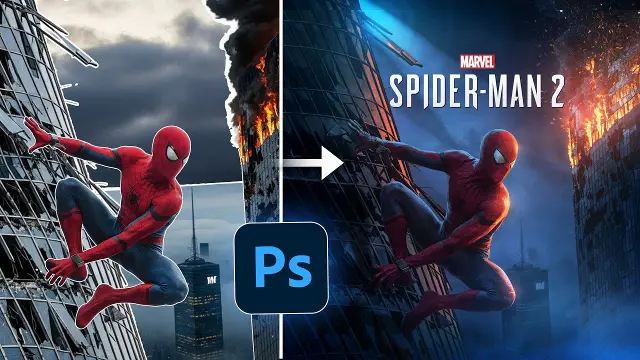
Spider-Man Poster Design Tutorial in Photoshop
Watch a full photo manipulation tutorial on creating a superhero poster without AI using Photoshop.
YouTube · Nour Art · 16 November 2025 Watch on YouTube
Tried this idea? Show how yours turned out.
I made this#nourart #photoshopmanipulation #photoshop
How to do it
What you need
- Photoshop
- Stock photos (Spider-Man figure, buildings, sky)
- Light-painting brushes
- Layer masks
Step by step
- Plan the poster idea and its composition first.
- Place the sky and buildings on separate layers and blend them together.
- Adjust the selection and reframe the composition.
- Correct the color and brightness across the elements.
- Paint blue light into the scene on its own pass.
- Paint orange light as a second pass.
- Finish with final light effects and color grading.
Tips
- Do the light painting in separate color passes — blue first, then orange — so each can be tuned independently.
- Save color grading for the very end, after all the lighting is painted in.
- Work with the free stock images and brushes linked in the description instead of generating the elements.
Written by Tagrazzi from the original's description and photo.
The title and summary are written by Tagrazzi; the video belongs to its creator and plays from YouTube.

Comments (0)
No comments yet. Be the first to comment.
Sign in to write a comment.