
Complete Beginner Guide to Mastering Wireframing in Figma
Comprehensive beginner walkthrough covering everything needed to confidently design professional wireframes in Figma.
YouTube · Ali Hassan · 18 September 2026 Watch on YouTube
Tried this idea? Show how yours turned out.
I made this#uiux #wireframing #figmatutorial
How to do it
What you need
- Figma
- Paper and pen for sketching
- Wireframe frames on the canvas
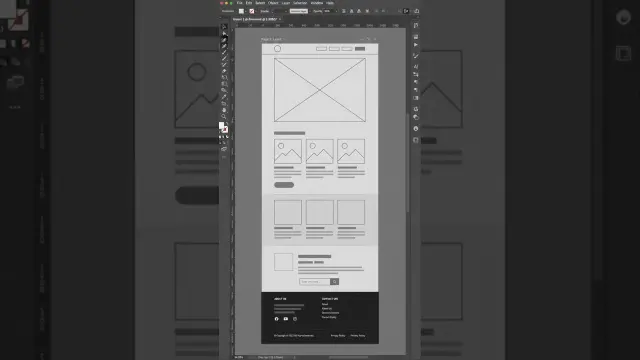
- Placeholder image boxes
- Text placeholder lines
- Buttons and input fields
- Navigation bar
- Site sections (hero, gallery, footer)
Step by step
- Sketch the layout on paper with simple boxes first
- Draw an X through boxes where images will go
- Mark text with plain horizontal lines
- Sketch each section in order: nav bar, hero, gallery, footer
- Rebuild the sketch in Figma as low-fidelity frames
- Add placeholder shapes for images and text
- Place buttons and input fields in grayscale only
- Move to high-fidelity color and real photos once the structure is set
Tips
- Do the rough sketch before opening Figma so layout decisions are already made
- Keep wireframes grayscale and text-free so feedback focuses on structure
- Cover the same sections as your sketch so nothing gets skipped when you build
Written by Tagrazzi from the original's description and photo.
The title and summary are written by Tagrazzi; the video belongs to its creator and plays from YouTube.











Comments (0)
No comments yet. Be the first to comment.
Sign in to write a comment.