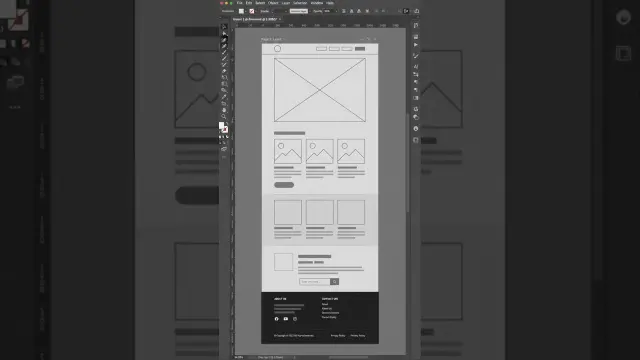
Building a Professional Website Wireframe from Scratch
Set up a 12-column grid and layout placeholders to build a structured website wireframe using modern UI software.
YouTube · mrxubr_builds · 23 October 2026 Watch on YouTube
Tried this idea? Show how yours turned out.
I made this#webdesign #wireframe #uidesign #uxdesign
How to do it
What you need
- UI design software
- New artboard/canvas
- 12-column layout grid
- Placeholder image boxes
- Text line placeholders
- Repeat grid tool
- Snapping/alignment settings
Step by step
- Create a blank artboard for the page.
- Set up a 12-column grid so everything aligns consistently.
- Lay out the header with logo and navigation placeholders.
- Add a large hero banner placeholder below the header.
- Build a row of feature columns using image boxes and text lines.
- Use the repeat grid tool and snapping to duplicate and align sections precisely.
- Finish with a footer block to complete the blueprint.
Tips
- Keep every element locked to the 12-column grid so spacing stays consistent down the page.
- Use grey boxes and text lines as placeholders instead of real content — it keeps attention on structure.
- Copy repeated sections with the repeat grid tool rather than rebuilding them, so measurements stay identical.
Written by Tagrazzi from the original's description and photo.
The title and summary are written by Tagrazzi; the video belongs to its creator and plays from YouTube.












Comments (0)
No comments yet. Be the first to comment.
Sign in to write a comment.