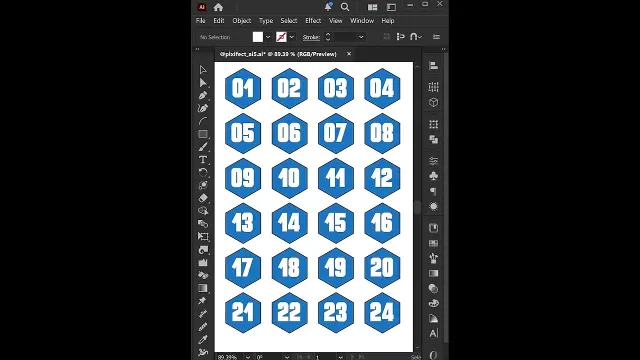
How to Efficiently Generate Number Sequences in Illustrator
Quick tutorial on producing organized number sequences efficiently within Adobe Illustrator.
YouTube · Pixifect · 30 June 2026 Watch on YouTube
Tried this idea? Show how yours turned out.
I made this#photoshop #graphicdesign #illustrator #adobeillustrator #adobe #logodesign #designer #mockup
How to do it
What you need
- Adobe Illustrator
- Hexagon shape tool or polygon tool
- Blue fill and white text
- Bold sans-serif font
- Align/distribute or grid guides
Step by step
- Draw a hexagon shape and fill it with blue.
- Type the starting number on top of the shape in bold white text.
- Center the number inside the hexagon using the alignment tools.
- Duplicate the hexagon and number across a grid of rows and columns.
- Update each copy's number in order (01, 02, 03 and so on).
- Keep the numbers as live text so they stay editable later.
Tips
- Keep a consistent two-digit format like 01, 02, 03 so the grid reads as one set.
- Build the grid with even spacing so the duplicated badges line up cleanly.
- Leave the numbers as editable text rather than outlining them, so renumbering stays quick.
Written by Tagrazzi from the original's description and photo.
The title and summary are written by Tagrazzi; the video belongs to its creator and plays from YouTube.





Comments (0)
No comments yet. Be the first to comment.
Sign in to write a comment.